
Statistics – Charging logs
Description
The ‘Charging Log’ page provides a complete chronological overview of all charging sessions recorded by the Eponet platform. Unlike the other statistics pages, which focus on summaries, reports and analyses, the charging log is designed to display the detailed history of each individual charging session.
This page is primarily used for troubleshooting, operational monitoring, customer support, auditing and technical analysis. Every activity recorded by the platform is listed along with the relevant information, enabling administrators to investigate individual charging sessions, review charging history and diagnose reported issues.
The charging log aggregates charging information from all available chargers and presents it in a searchable, filterable list. It serves as the primary reference for clarifying questions such as:
-
When did a customer start charging?
-
Which charger was used?
-
Which RFID card or user initiated the charging session?
-
Was the charging session completed successfully?
As this page contains detailed operational information, it is frequently used by support teams, system administrators, charging network operators and facility managers.
All information displayed on this page is automatically updated based on the selected filters and the reporting period.
Navigation
To access the charging log:
-
Open the Eponet portal.
-
In the left-hand navigation menu, go to ‘Statistics’.
-
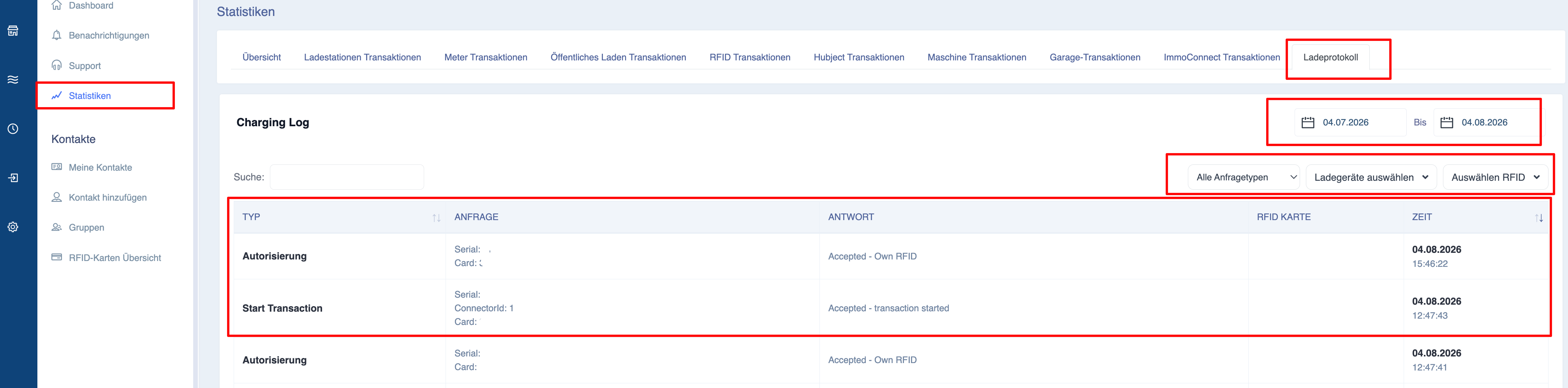
Under the ‘Statistics’ tabs, select ‘Charging Log’.
-
The page displays all charging processes that match the selected filters.
Purpose of the charging log
The charging log provides a detailed operational history rather than statistical summaries.
Typical use cases include:
-
Investigating customer support enquiries.
-
Reviewing charging activities.
-
Analysing charging behaviour.
-
Reviewing historical charging records.
Unlike the overview page, which displays aggregated values, the charging log focuses on the charging station’s activities.
Understanding the page layout
The charging log consists of three main sections:
-
Filter
-
‘Charging Activities’ table
-
Export functions
Each section is designed to enable users to quickly find and analyse specific loading operations.
Filtering charging operations
The charging log supports various filters that can be used to narrow down the charging processes displayed.
The table is automatically updated whenever a filter is changed.
Date range
The date range you select determines which charging sessions are displayed.
Changing the reporting period updates the charging log immediately.
Charger selection
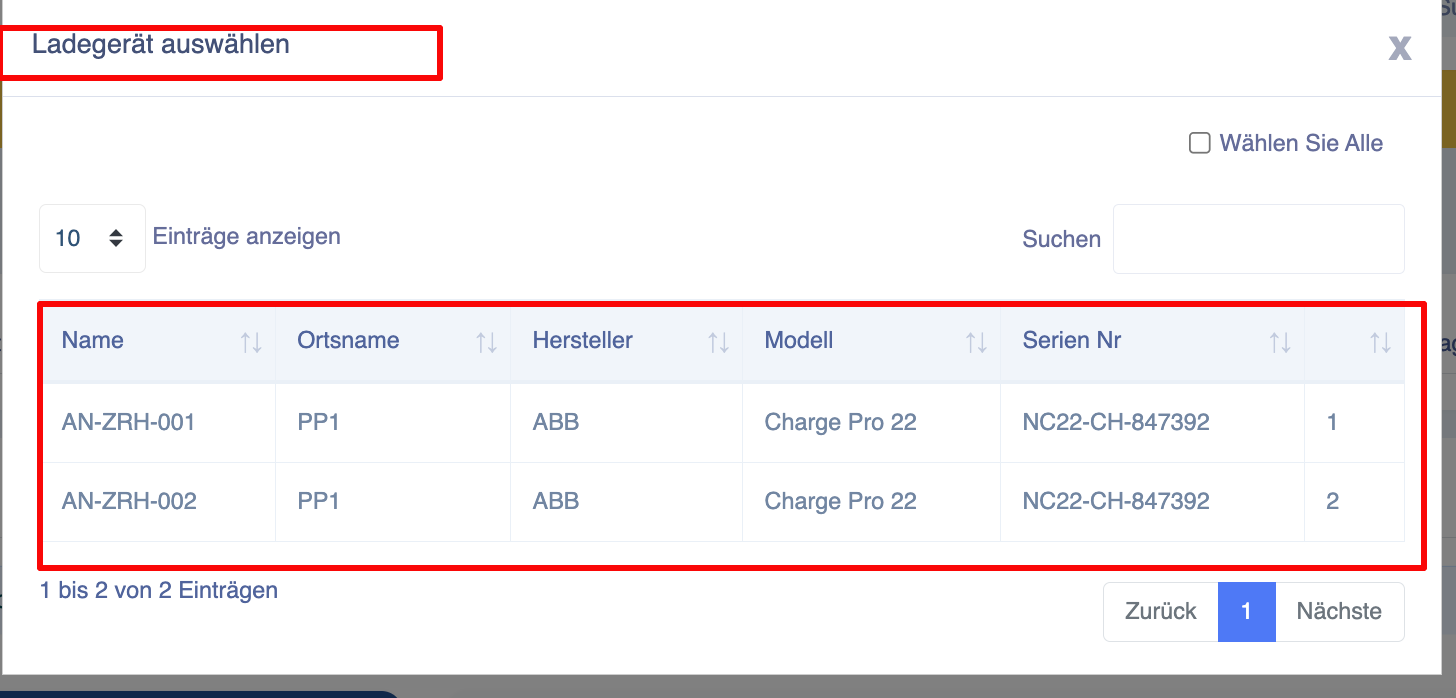
The ‘Select Charger’ filter allows users to view charging sessions for one or more chargers.
The charger selection dialogue supports:
-
Search
-
Single selection
-
Multiple selection
-
Select all
This is useful if you want to examine the activity on a specific charger or at a specific location.
Search
Users can quickly find charging sessions using the search field.
Depending on your platform’s configuration, users can use the following criteria for their search:
-
Charger
serial number -
RFID card number
- Type
The table is updated immediately as soon as search criteria are entered.
Explanation of the charging history table
Each row in the charging history represents a completed charging session.
The table contains detailed operational information that can be used for reporting, troubleshooting or auditing.
Type
Displays the type of request received by the charger:
Charger
Displays the charger that carried out the charging process.
The report may contain the following:
-
Charger serial number
-
Port ID
This information precisely identifies the charging station in question.
RFID
Displays the RFID card or the authenticated user who initiated the charging process.
Depending on your installation, this may include the following:
-
RFID number
This enables administrators to assign charging sessions to specific users.
Time
Displays the exact date and time at which the activity was recorded
Response
Displays the exact response to the request received by the charger.
This information is useful when investigating incomplete or unusual charging sessions.
Exporting the charging log
The charging log supports the export of filtered charging data.
Before exporting, check:
-
Selected date range
-
Selection of the charger
-
Search criteria
- Request type
Only charging sessions that match the active filters will be included in the exported report.