
Two-factor authentication (2FA), also known as two-step authentication, is an additional security measure that protects access to online accounts and systems by requiring a second, independent factor in addition to a password.
Please note
: Two-factor authentication is a security feature which, if used incorrectly, cannot simply be deactivated via Eponet. It can only be enabled via the Google or Microsoft Authenticator app – and can therefore only be deactivated via the same app.
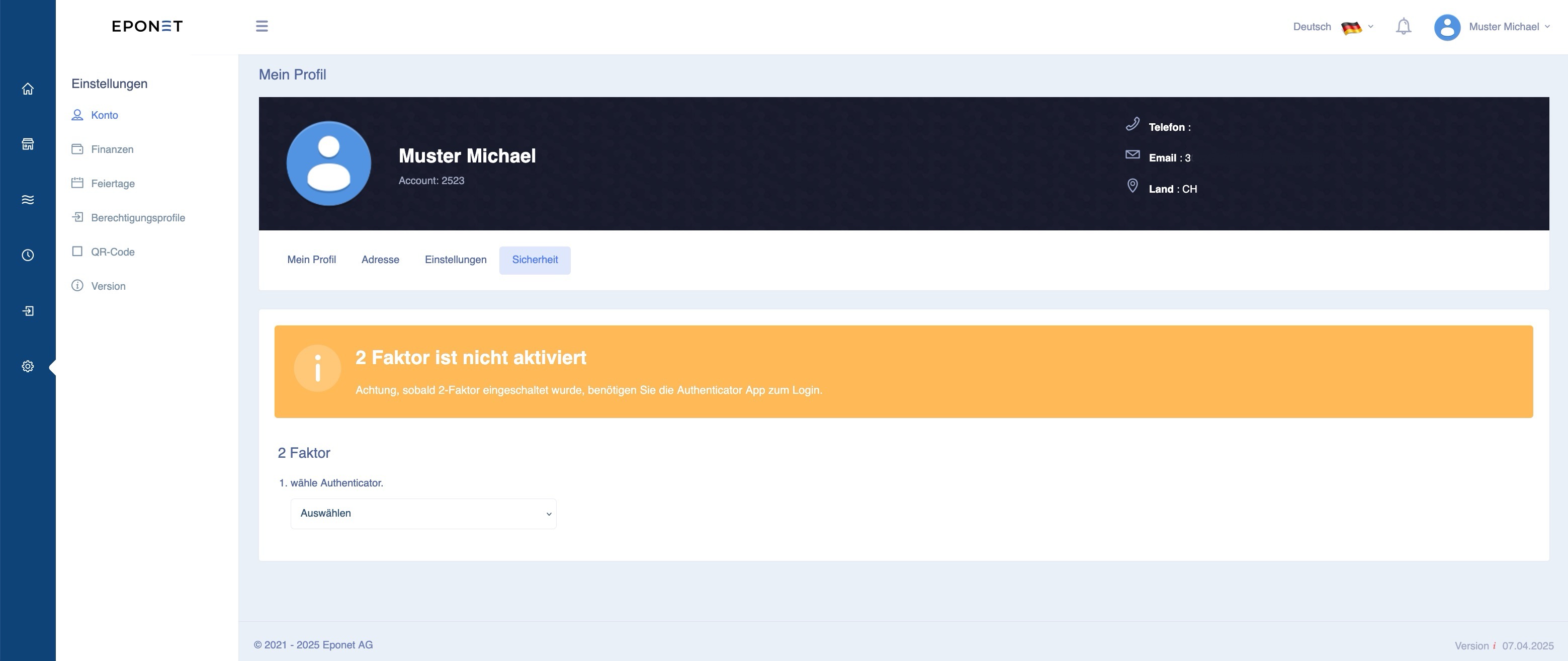
You can find two-factor authentication in your account/My Profile under the ‘Security’ tab:
Manual deactivation of two-factor authentication by Eponet
If two-factor authentication has been enabled and you are unable to deactivate it yourself, for security reasons Eponet can only reactivate your account for a fee by carrying out the following steps.
- Please complete the ‘Deactivation of two-factor authentication’ form and send it to us, signed and accompanied by a copy of your identity document, to info@eponet.ch
- Eponet will verify the form and the details against your account and deactivate two-factor authentication
- Eponet will reset your password – you can use the ‘Forgotten password’ option to have a new password sent to you.
This process may take up to 15 working days and will incur a flat-rate fee of 45 CHF, which will be debited from your account. Please ensure that this does not cause your account balance to fall below the minimum balance, as you will otherwise no longer be able to use Eponet’s services.