
Statistics – ‘Machine Transactions’ page
Description
The ‘Device Transactions’ page provides a detailed overview of all transactions recorded by the devices linked to your Eponet account. Unlike charging points, which are used exclusively for charging electric vehicles, ‘devices’ here refer to connected devices that consume energy and communicate with the Eponet platform, such as smart home appliances, industrial equipment, vending machines or other supported IoT devices.
On this page, administrators and facility managers can monitor device activity, analyse energy consumption, review operating costs and generate reports for maintenance, accounting or operational analysis purposes.
Each recorded transaction represents a completed machine operation during which energy consumption and the associated costs were measured. The page enables users to quickly identify how machines are being used at different locations and over different time periods.
All information displayed is automatically updated as soon as filters or the selected reporting period are changed.
Navigation
To access the ‘Machine Transactions’ page:
-
Open the Eponet portal.
-
Select ‘Statistics’ from the navigation menu on the left-hand side.
-
From the available statistics tabs, click on ‘Machine Transactions’.
-
The page displays all recorded machine transactions for the selected reporting period.
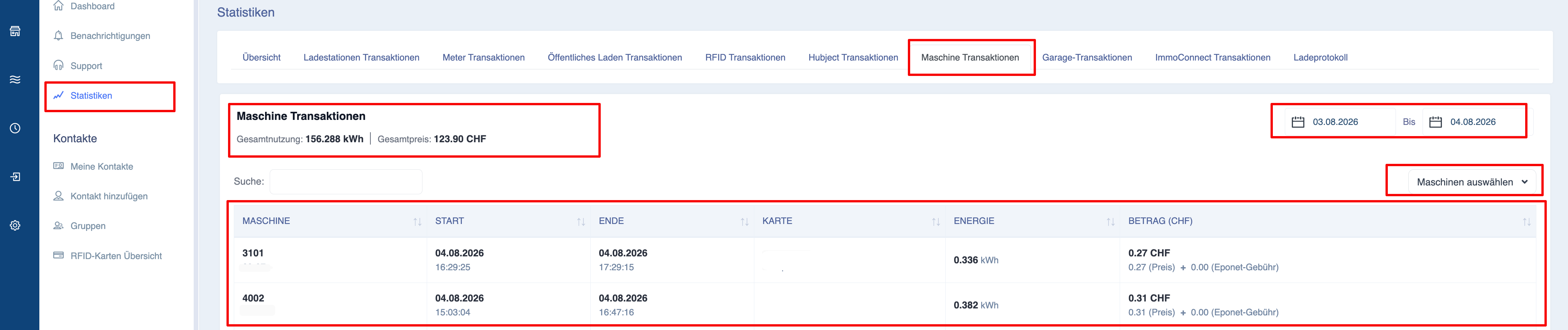
Explanation of the page layout
The ‘Machine Transactions’ page consists of three main sections:
-
Summary information
-
Machine filters
-
Detailed transaction report
These sections provide both a general overview and detailed information on each recorded machine transaction.
Overview Information
The ‘Summary’ section displays key performance indicators for all machine transactions included in the selected reporting period.
These values are automatically recalculated whenever the filters are changed.
Total energy consumption
Displays the total energy consumption of all selected machines.
The value is displayed in kilowatt-hours (kWh).
Total Cost of Ownership
Displays the calculated total cost of ownership for all machine operations.
The amount displayed provides administrators with a quick overview of the operating costs.
Select Machines
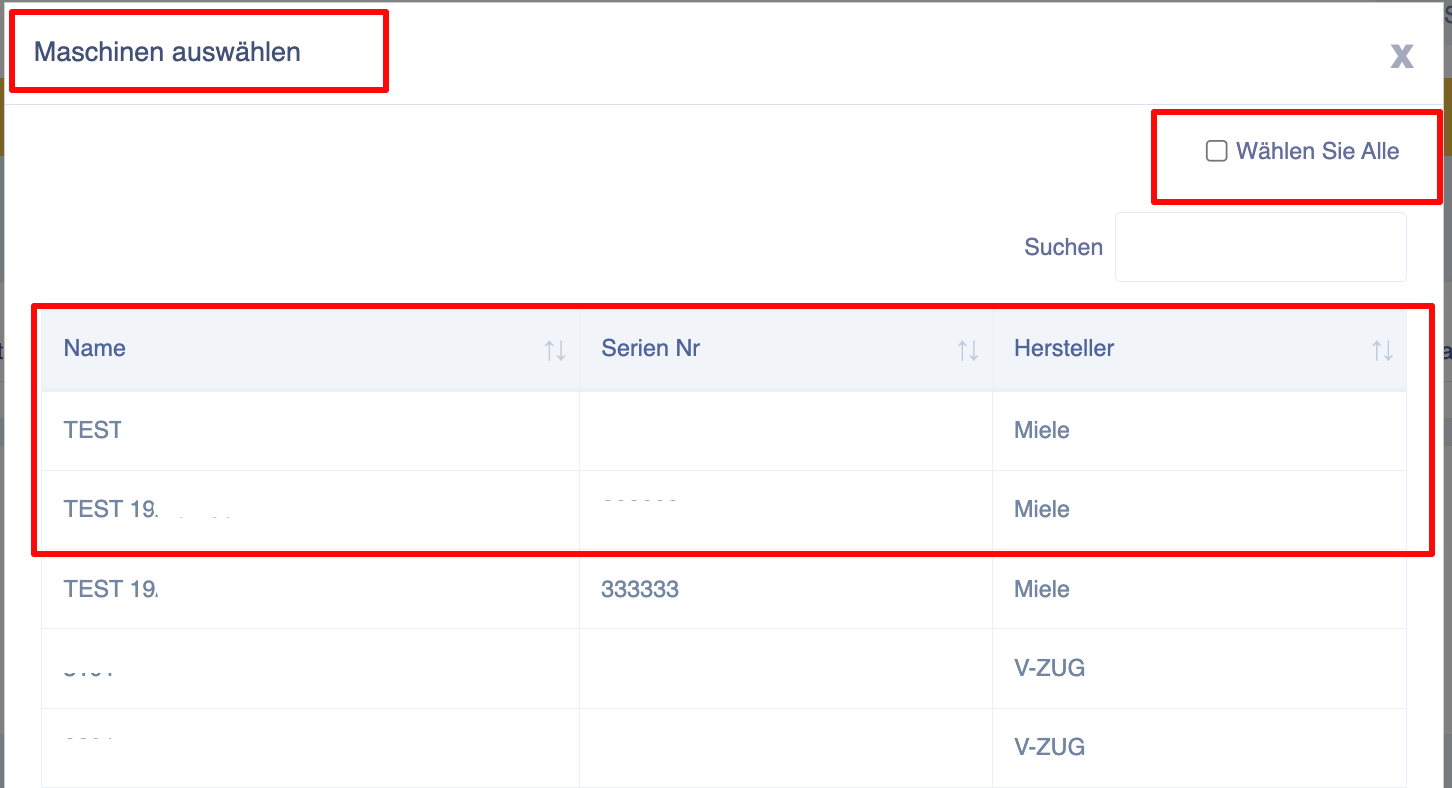
The ‘Select machine’ filter allows users to view transactions for one or more connected machines.
Clicking on the filter opens a selection window showing all machines to which the current user has access.
Each machine entry typically displays the following:
-
Device name
-
Serial number
-
Manufacturer
This information helps users to quickly identify the correct device when several devices are installed at different locations.
Users can:
-
Search for a device
-
select a single device
-
Select multiple devices
-
select all available devices
When multiple machines are selected, their transaction data is summarised in a report.
Date range
The date range you select determines which machine transactions are included in the report.
Changing the report period updates the display immediately:
-
Total energy
-
Total costs
-
Transaction report
Search
Users can quickly find specific machine transactions using the search field.
Typical search terms are:
-
Machine name
-
Device ID
-
RFID card
The results are updated automatically as you type.
Explanation of the transaction report
The transaction report lists all machine transactions that match the selected filters.
Each row represents a completed machine operation.
The report contains detailed operational information that can be used for reporting, auditing, maintenance planning and cost analysis.
Machine
Displays the machine involved in the transaction.
Depending on the system configuration, this column may contain the following information:
-
Machine name
-
Machine ID
This enables users to identify the exact device that was used during the transaction.
Start time
Displays the exact date and time at which the machine operation began.
End time
Shows the exact date and time at which the machine operation ended.
Together with the start time, this enables users to determine the duration of each operation.
RFID card
Displays the RFID card used to authorise or start the machine.
Where available, the report also displays the reference number, making it easy to identify who operated the machine.
This is particularly useful in shared environments where several users have access to the same equipment.
Energy consumption
Displays the amount of electricity consumed whilst the machine was in operation.
The value is given in kWh.
This enables administrators to compare the energy consumption of different machines or users.
Transaction costs
Displays the calculated costs associated with the completed machine transaction.
The amount shown reflects the pricing rules configured for your installation.
Totals
Two summary lines are displayed at the end of the report.
Page total
Displays only the totals for the machine transactions currently visible on the active page.
Grand total
Displays the totals for all machine transactions that match the selected filters, regardless of pagination.
This allows users to track the total operational activity for the selected reporting period.
Exporting machine reports
The ‘Machine Transactions’ page supports the export of filtered transaction reports.
Before exporting, check the following:
-
Date range
-
Selected machines
-
Search criteria
Only transactions that match the current filters will be included in the exported report.