
Einleitung
Eponet bietet eine Schnittstelle zur Übertragung von Last- und Zählerdaten im innosolvenergy-Format. Diese
Schnittstelle wird im Folgenden beschrieben.
Die Innosolvenergy-Schnittstelle wurde von Innosolv genehmigt! Die Schnittstelle wurde gemäß den Innosolv-Spezifikationen erstellt. Wenn Sie Fragen haben oder Anpassungen benötigen, wenden Sie sich bitte an Ihren Innosolv-Systemintegrator oder an Innosolv. Eponet kann hier keine Anpassungen vornehmen.
Format
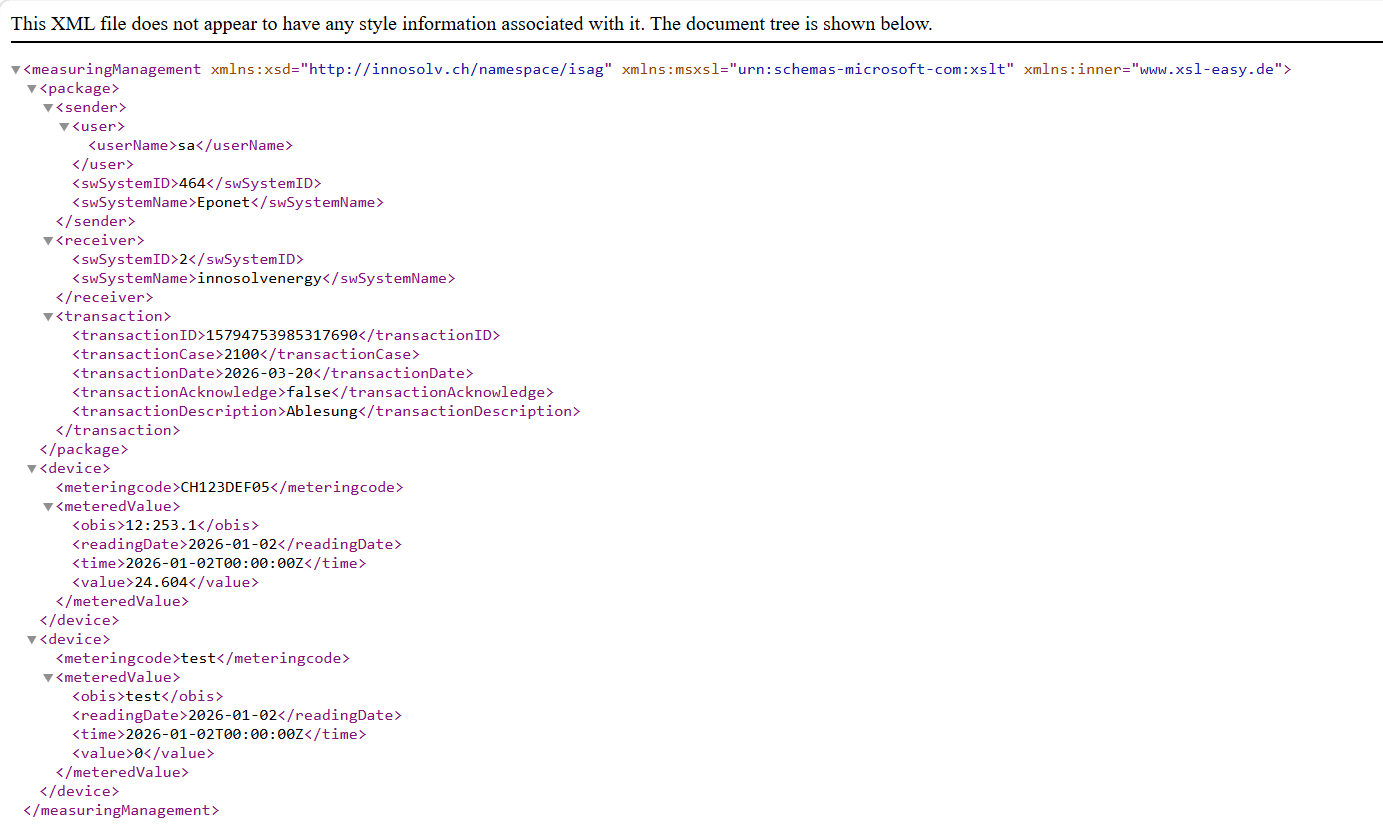
Die Daten können entweder im XML- oder im CSV-Dateiformat erstellt werden. Der Unterschied liegt im innosolvenergy-Protokoll.
XML-Daten enthalten die kumulierten Werte pro Tag im ausgewählten Zeitraum pro Messgerät. Die CSV-Datei enthält hingegen den Energieverbrauch in 15-Minuten-Intervallen pro Messgerät.
Ein Messgerät ist entweder ein Zähler (Wasser, Strom, Wärme usw.), eine Ladestation oder eine RFID-Karte.
CSV-Format:
Beim CSV-Dateiformat wird eine Zeitreihendatei im innosolv-Format erstellt. Diese enthalten eine Statusspalte. Eponet setzt den Status auf drei mögliche Werte:
W: Echter Wert. Eponet hat den Wert direkt vom Messgerät erhalten.
F: Fehlender Wert. Wenn Eponet keinen Wert vom Messgerät erhält, das Gerät aber normal meldet (d. h. online ist), wird trotz des fehlenden Werts ein W gesetzt. Denn Eponet weiß: Würde ein anderer Wert als 0 angezeigt, hätte das Messgerät diesen auch liefern können.
E: Ersatzwert. Es kann vorkommen, dass ein Messgerät ein Intervall von mehr als 15 Minuten hat. Beispielsweise kann ein Zähler um 14:00 Uhr einen Wert von 100 und um 15:00 Uhr den nächsten Wert von 200 anzeigen. Eponet setzt den Wert dann um 14:15 Uhr auf 125, um 14:30 Uhr auf 150 und um 14:45 Uhr auf 175. Diese Werte werden dann mit dem Status E gekennzeichnet.
Das Gleiche passiert oft bei Ladestationen, die beispielsweise um 3:00 Uhr morgens den Ladevorgang beenden. Der Kunde heizt das Fahrzeug dann beispielsweise um 7:00 Uhr morgens 2 Minuten lang vor. Nun kann es vorkommen, dass dieser Verbrauch in den 2 Minuten nicht übertragen wird (abhängig von der Einstellung im Ladegerät). Es besteht nun eine Diskrepanz zwischen dem Stoppwert und den übertragenen Werten. Eponet berechnet diese dann neu und kennzeichnet die Werte mit dem Status E.
Beispiel-CSV-Datei:
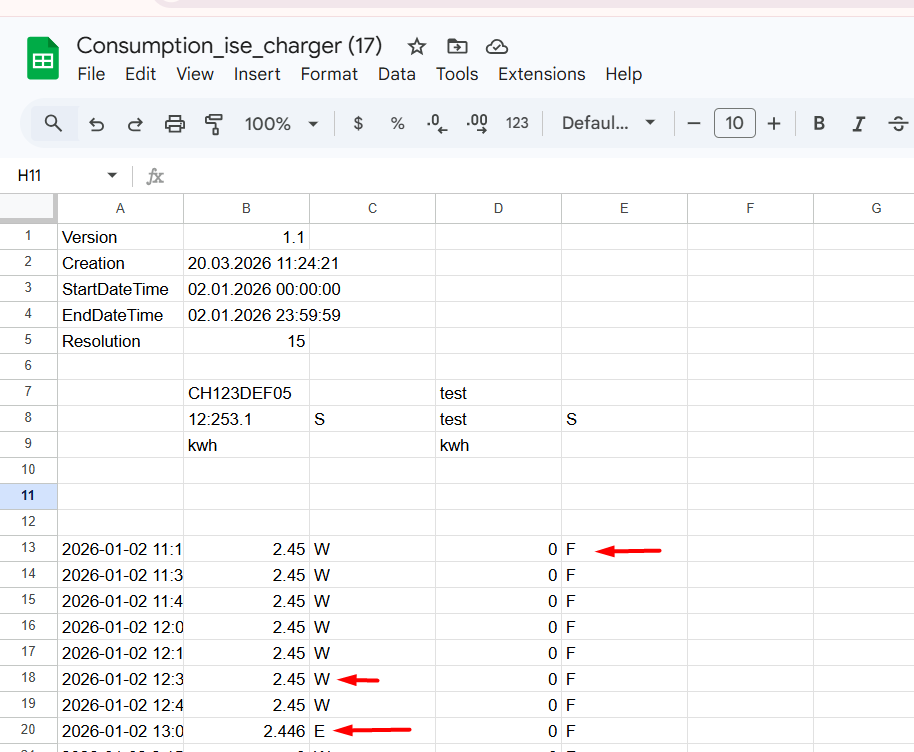
S- Status
Erstellung – Datum, an dem die Datei exportiert oder heruntergeladen wurde
CH123 – Obis-Wert
12:253:1 – Zählerstand
Beispiel-XML-Datei:
Einrichtung
In den Registerkarten Ladestation, Zähler und RFID-Karten können Sie die Geräte hinzufügen, die Sie für den Datenexport benötigen.
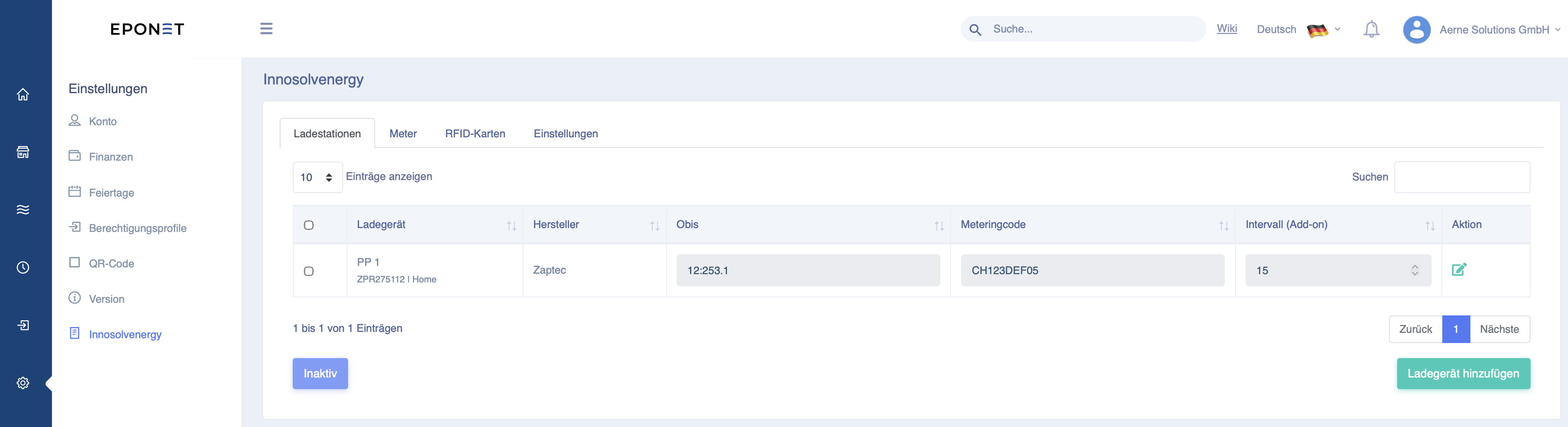
Beim Hinzufügen von Geräten haben Sie die Möglichkeit, den OBIS-Code und den Messcode anzugeben. Der OBIS-Code identifiziert den Tarif, während der Messcode das Gerät selbst identifiziert. Im Beispiel wäre dies die Ladestation.
*Obwohl der OBIS-Code definiert werden kann, werden derzeit keine unterschiedlichen OBIS-Codes für verschiedene Tarife unterstützt. Der Tarifcode ist daher immer derselbe.
Bei Zählern und Ladegeräten werden alle Werte für das jeweilige Gerät exportiert. Bei RFID-Karten werden alle mit der entsprechenden Karte gekauften Leistungen exportiert, auch wenn dies an verschiedenen Ladegeräten erfolgte.
Bei RFID-Karten wird standardmäßig die RFID-Kartennummer als Messcode verwendet. Sie haben jedoch die Möglichkeit, diesen Messcode zu überschreiben und einen eigenen Code festzulegen.
Bitte beachten Sie: Wenn der RFID-Kartencode überschrieben wird, enthält die exportierte Datei möglicherweise keinen Verweis mehr auf die Karte, wie sie im Eponet-Portal verwaltet wird.