
Setting up Wago with ECT_Utility
The ECT_Utility programme allows EnergyControl to be commissioned and updated on several Wagos simultaneously. It is
currently for internal use only, but will be made available to our integrators in future.
Settings
The settings are saved for the local user and are not overwritten during updates. Settings must be saved and only take effect in new ‘tabs’ after saving, so as not to disrupt ongoing parameterisation.
On first start-up, the paths should be checked and adjusted. The expected firmware structure can be found at https://wiki.eponet.ch/link/419#bkmrk-firmware-updaten.
Load Wago
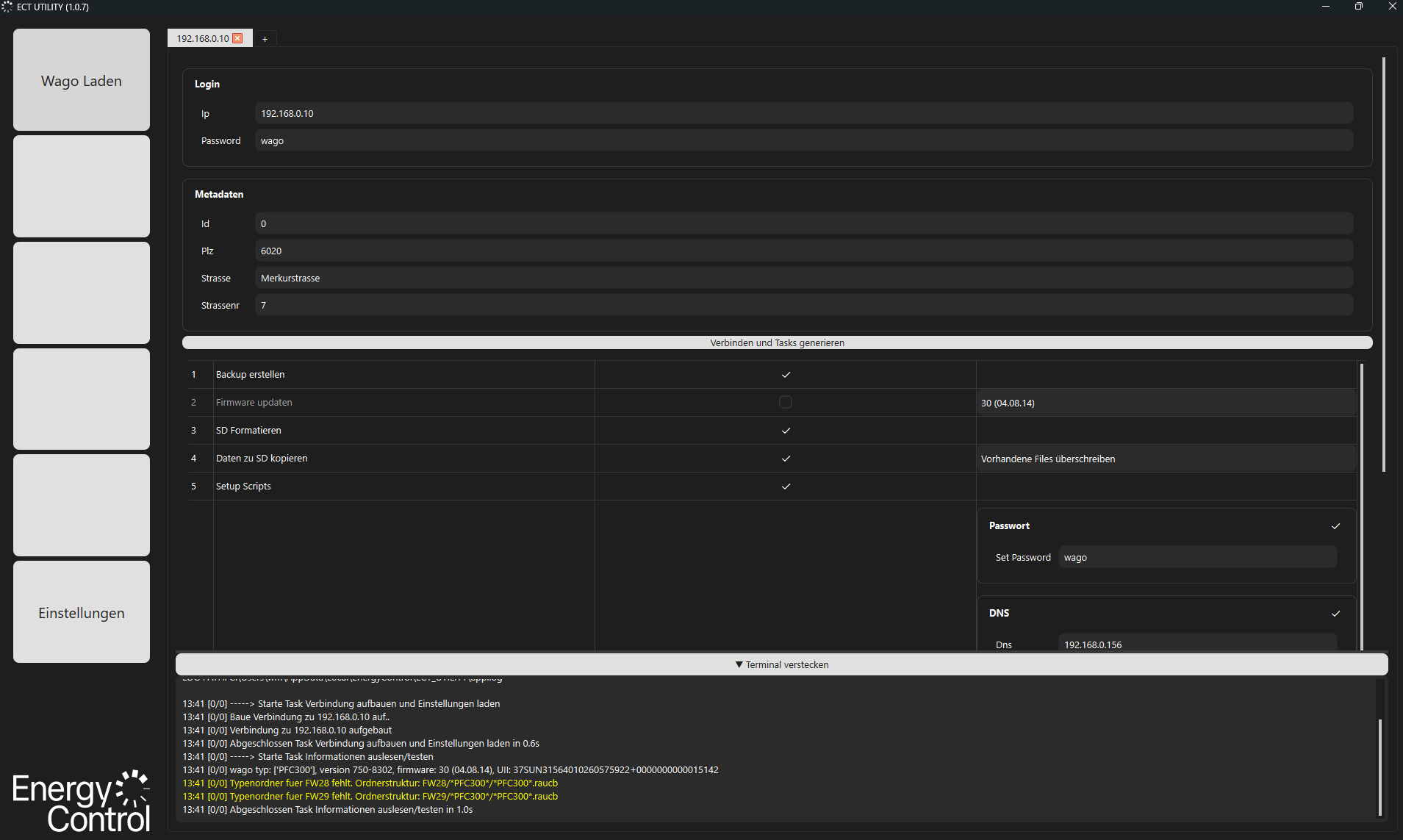
In the “Load Wago” tab, you can connect to the Wago, generate tasks and execute them.
Multiple tabs can be opened in the top bar to set up several Wago units in parallel.
- Enter the Wago’s IP address and password
- Enter metadata if a backup is to be made (if the system was already in operation)
- Click the ‘Connect and Generate Tasks’ button (this allows you to try again even after an error)
- A list of tasks is generated; these can be enabled or disabled using the tick boxes. Additionally, options can be configured depending on the task.
- Click ‘Execute Tasks’ to start the tasks.
Tasks
Create backup
Creates a backup of /media/sd/data in {Settings – Server Backup Path} with metadata in the format {WagoId}_{Id}_{Postcode}{Street}{No.}; this option is automatically deselected if /media/sd/data does not exist
Update firmware
Updates the firmware version to the selected version. This option is disabled if the Wago version on the server is the latest or newer. Versions are searched for in {Settings – Server Firmware Path}; the directory structure is crucial here. The software expects the following structure:
-
- FW30 (The system searches for ‘FW’, followed by the firmware number)
- Firmware_CC100_040814_30 (folder in which the Wago version is searched for, i.e. CC100, PFC200, PFC300; if only ‘PFC’ is specified, PFC200 is assumed)
- CC100-Linux_update_V040814_30_r2bf9a49e28.wup (the .wup file is then extracted into a .raucb file; this happens automatically the first time – it takes quite a long time.)
- Firmware_CC100_040814_30 (folder in which the Wago version is searched for, i.e. CC100, PFC200, PFC300; if only ‘PFC’ is specified, PFC200 is assumed)
- FW30 (The system searches for ‘FW’, followed by the firmware number)
Format the SD card
Format the SD card. If no backup has been created, all data will be lost.
Copy data to SD
Copies the data from {Settings – Server SD Data Path} to /media/sd/data on the Wago. By default, data is overwritten, but this can be prevented by selecting ‘Ignore existing files’. As a general rule, the SD card should be formatted before each setup to avoid errors.
Setup Scripts
Copies the start-up scripts from /media/sd/data/ect_client/scripts to /etc/init.d, sets them to run automatically at start-up and starts them. The scripts are responsible for monitoring Codesys and reading Wago data such as wago_uuid.
Wago Settings
Applies the selected Wago settings. Settings can be changed and deselected in groups.
- DNS: Generally use
the router on the network - Bridge 0: When switching to DHCP, the IP address setting is used to reconnect. If a connection to the specified address cannot be established after an IP change, an error occurs.
Docker Setup
Pulls the selected containers and starts the correct Docker Compose file.
- Docker profiles: No profile = no VPN, HOOC = install Hooc embedded, Tailscale = install and set up Tailscale client
- Server: The server to connect to also determines the client version – leave this set to Prola for now.
Terminal
The terminal displays useful information about the tasks being carried out. This includes the firmware, UII and timestamps:
14:16 [0/0] -----> Starte Task Verbindung aufbauen und Einstellungen laden
14:16 [0/0] Baue Verbindung zu 192.168.0.10 auf..
14:16 [0/0] Verbindung zu 192.168.0.10 aufgebaut
14:16 [0/0] Abgeschlossen Task Verbindung aufbauen und Einstellungen laden in 0.4s
14:16 [0/0] -----> Starte Task Informationen auslesen/testen
14:16 [0/0] wago typ: ['PFC300'], version 750-8302, firmware: 30 (04.08.14), UII: 37SUN31564010260575922+0000000000015142
14:16 [0/0] Typenordner fuer FW28 fehlt. Ordnerstruktur: FW28/*PFC300*/*PFC300*.raucb
14:16 [0/0] Typenordner fuer FW29 fehlt. Ordnerstruktur: FW29/*PFC300*/*PFC300*.raucb
14:16 [0/0] Abgeschlossen Task Informationen auslesen/testen in 1.0s
The terminal can be resized and also hidden. Warnings are displayed in yellow and do not abort the process. Errors are displayed in red and abort the process immediately.