FAQ - Rund ums Portal
Fragen Antworten zum Eponet Portal, Geld ein-/auszahlen, Login, usw.
- Gebührenstruktur beim Aufladen des Eponet-Kontos
- Bankverbindung zum Geld einzahlen / Saldo aufladen - neue Bankverbindung
- Ich habe Geld auf mein Konto einbezahlt. Wie lange dauert es bis das Geld auf dem Konto ist?
- Ich habe Geld auf mein Konto einbezahlt. Wieso fehlt die MwSt.?
- Wieso muss ich zum Geld auszahlen meine E-Mail Adresse validieren?
- Ich kann mich nicht mehr einloggen - Die Login Seite verlangt 2 Faktor Verifizierung
- Passwort vergessen - Wieso erhalte ich kein E-Mail um ein neues Passwort einzugeben?
- Mein QR-Code Einzahlungsschein geht nicht
Gebührenstruktur beim Aufladen des Eponet-Kontos
Eponet-Gebühren – Informationen
: Bei der Nutzung von Kreditkarten, TWINT usw. fallen Gebühren und Aufwendungen an. Bei der Kreditkartenabwicklung werden die Abwicklung einschließlich Betrugsverdachts- und Sicherheitsprüfungen, CVV sowie die sichere Aufbewahrung der Finanztransaktionsdaten von einem renommierten Drittanbieter durchgeführt. Dieser Prozess und die anfallenden Kosten werden durch die Eponet-Gebühren gedeckt. Sie können diese Gebühren vermeiden, indem Sie die kostenlose Einzahlung per QR-Code-EZ-Schein nutzen.
Gebührenstruktur beim Aufladen des Eponet-Kontos
Das Eponet-Konto basiert auf einem Prepaid-System. Beim Aufladen stehen Ihnen verschiedene Zahlungsmethoden mit unterschiedlichen Kostenstrukturen zur Verfügung.
Zahlungsmethoden
Banküberweisung (SEPA/QR-Rechnung)
Kostenstruktur: 0 %
Gutschriftdauer: 2–3 Werktage
Beispiel: Überweisung von CHF 50.00 → Verfügbares Guthaben CHF 50.00
Kreditkartenzahlung (Visa, Mastercard, TWINT usw.)
Gebührenstruktur: 4,5 % Transaktionsgebühr + 50 Rappen
Gutschriftdauer: Sofort
Beispiel: Zahlung von CHF 52,75 → Verfügbares Guthaben CHF 50,00
Erläuterung der Transaktionsgebühren
Kreditkartenunternehmen erheben für jede Transaktion eine sogenannte Interchange-Gebühr. Diese Gebühr wird von den Kartenausstellern (Issuing Banks) und Zahlungsnetzwerken (Visa, Mastercard) festgelegt und beträgt in unserem System 4,5 %.
Wichtig: Diese Gebühr wird vollständig an den Zahlungsdienstleister weitergegeben. Eponet erzielt hieraus keine Einnahmen.
Transparenzansatz
Viele E-Mobility-Anbieter kalkulieren Kreditkartengebühren in ihre Grundpreise ein, wodurch diese für den Kunden nicht sichtbar sind. Eponet verfolgt einen transparenten Ansatz:
• Sichtbare Kostenstruktur: Sie sehen genau, welche Kosten
anfallen• Wahlfreiheit: Sie entscheiden, welche Zahlungsmethode Sie
bevorzugen• Keine versteckten Gebühren: Alle Kosten werden vor der Transaktion angezeigt
Guthabenverwendung
Das aufgeladene Guthaben steht Ihnen vollständig für Ladevorgänge zur Verfügung:
✓ 100 % Verfügbarkeit – Das gesamte Guthaben kann für Aufladungen genutzt
werden ✓ Keine Zusatzgebühren – Bei der Aufladung fallen keine weiteren Kosten an
✓ Direkte Abrechnung – Gutschriften werden vollständig an die Betreiber weitergeleitet
✓ Kostenlose Verwaltung – Die Kontoführung ist gebührenfrei
Wirtschaftliche Hintergründe
Die Transaktionsgebühr beim Aufladen kann nicht von Eponet übernommen werden, da:
1. Das Guthaben zu 100 % für Ladevorgänge verwendet wird
2. Die Auszahlung vollständig an die Ladestationsbetreiber erfolgt
3. Die Guthabenverwaltung bereits als kostenlose Dienstleistung erbracht wird
Die Gebühr entspricht den tatsächlichen Kosten des Zahlungsdienstleisters und wird ohne Aufschlag weitergegeben.
Häufig gestellte Fragen
Erzielt Eponet Einnahmen aus den Kreditkartengebühren?
Nein. Die 4,5 % werden vollständig an den Zahlungsdienstleister weitergeleitet.
Warum wird die Kreditkartenzahlung angeboten, wenn Gebühren anfallen?
Um Ihnen maximale Flexibilität zu bieten. Manche Nutzer ziehen die sofortige Verfügbarkeit des Guthabens der gebührenfreien, aber verzögerten Banküberweisung vor.
Wie lassen sich Transaktionsgebühren vermeiden?
Durch die Nutzung von Banküberweisungen oder QR-Rechnungen entstehen keine Transaktionsgebühren.
Entspricht die Gebührenstruktur den Branchenstandards?
Ja. Die Interchange-Gebühren für Kreditkartentransaktionen liegen im europäischen Durchschnitt zwischen 3,5 % und 5 %.
Empfehlung
: Für regelmäßige Aufladungen empfehlen wir die Nutzung von Banküberweisungen, um Transaktionsgebühren zu vermeiden. Für einmalige oder dringende Aufladungen bietet die Kreditkartenzahlung maximale Flexibilität.
In unserem Video erklären wir das Prinzip in 60 Sekunden.

Bankverbindung zum Geld einzahlen / Saldo aufladen - neue Bankverbindung
Neue Bankverbindung
Wenn Sie einen QR-Code Einzahlungsschein in Ihrem Konto generieren, ist bereits die neue Bankverbindung hinterlegt!
Um gebührenfrei Geld auf sein Konto einzuzahlen, gibt es die Möglichkeit auf dem Portal oder über das Eponet Go App einen QR-Code Einzahlungschein zu generieren. Bitte benutzen Sie immer einen aktuellen QR-Code Einzahlungschein. So wird Ihr Geld sicher und automatisch auf Ihr Konto übertragen. Die neue Bankverbindung ist bereits hinterlegt.
In diesem QR-Code Einzahlungsschein ist die korrekte und aktuelle Eponet Bankverbindung und einen Referenzcode hinterlegt. Mit dem abscannen des Original QR-Code Einzahlungsschein ist somit sichergestellt, dass das Geld automatisch auf Ihr Konto übertragen wird.
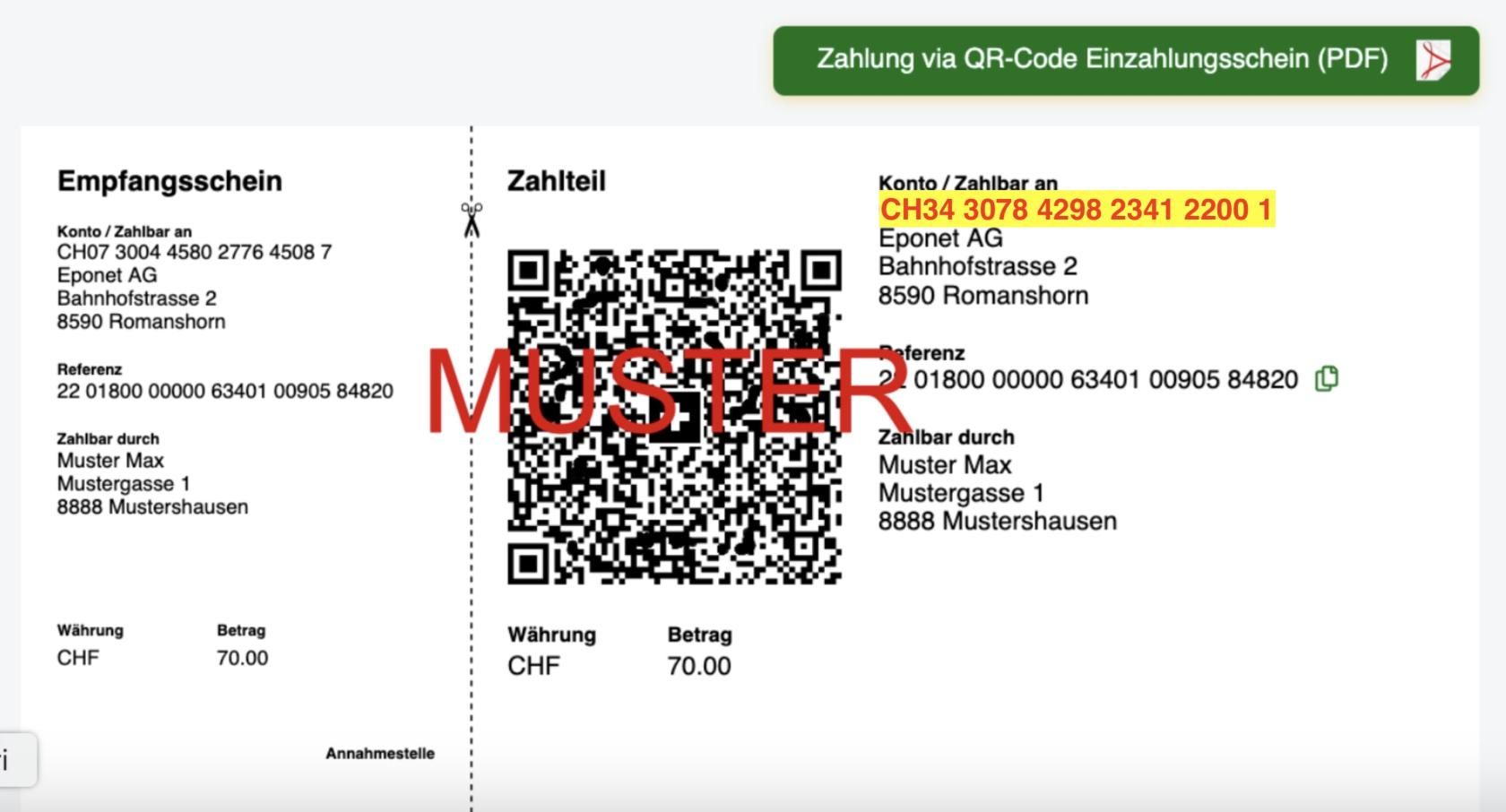
Information zu nachfolgendem Hinweis:

Wenn Sie den QR-Code Einzahlungsschein scannen werden alle Daten korrekt übernommen und es besteht kein Risiko, dass Ihnen diese CHF 28.- belastet werden. Diese Pauschale von CHF 28.- wir nur belastet, wenn Sie die Daten (IBAN) manuell eintragen und dann der QR-Referenzcode fehlt oder falsche Daten bei der manuellen Eingabe entstehen. In so einem Fall muss bei uns die Zahlung manuell gesucht und Ihrem Konto zugewiesen werden. Dieser enorme Zeitaufwand kann vermieden werden, wenn Sie den QR-Code Einzahlungsschein einfach mit Ihrer Bank-App scannen.
Die Bankverbindung hat sich geändert, damit wir diese kostenlose Einzahlung für Sie optimieren und in Zukunft schneller einen Abgleich machen können. Vielen Dank für Ihr Verständnis.
Ich habe Geld auf mein Konto einbezahlt. Wie lange dauert es bis das Geld auf dem Konto ist?
Beim Saldoaufladen mit dem QR-Code EZ-Schein gibt es ein Textfeld mit der Information wie lange es dauert, bis der Betrag auf Ihrem Konto gutgeschrieben wird. Eponet kann diesen Dienst kostenfrei und ohne Gebühren für Sie anbieten!
Zahlungseingang bei Banküberweisungen auf Ihrem Konto:
Wann wird mir das per Banküberweisung überwiesene Geld auf meinem Konto gutgeschrieben?
Beispiel
Tag 1: Sie tätigen eine Banküberweisung
Tag 2: Geldeingang auf dem Bankkonto von Eponet, die endgültige Verbuchung erfolgt am folgenden „Tag 3“ über die Bank
Tag 3: Aufbereitung der Zahlungen vom Vortag durch die Bank in die Schnittstelle für die Eponet-Plattform. Die Übermittlung der Daten an die Plattform erfolgt bis 21:30 Uhr und wird von Eponet sofort Ihrem Konto gutgeschrieben.
Ihre Transaktion wird Ihnen zum Zeitpunkt des Zahlungseingangs mit dem Datum des Zahlungseingangs bei der Bank angezeigt.
Bitte beachten Sie, dass dieser Prozess rein digital abläuft und nicht beschleunigt werden kann. Der Prozess findet an Werktagen statt; am Wochenende werden keine Bankdaten von der Bank verarbeitet, diese Vorgänge bleiben daher bis zum folgenden Werktag ausgesetzt.
3 -5 Arbeitstage ist die übliche Bearbeitungszeit - Wenn es eilt, bitten wir Sie den Saldostand mittels TWINT / Kreditkarte aufzuladen. Der Betrag ist dann sofort auf dem Konto.
Haben Sie die rechtzeitige Aufladung verpasst und möchten den Saldo sofort erhöhen? Mit Kreditkarte oder TWINT ist der Betrag innert Sekunden auf dem Konto und Sie können Ihre Dienste weiter nutzen.
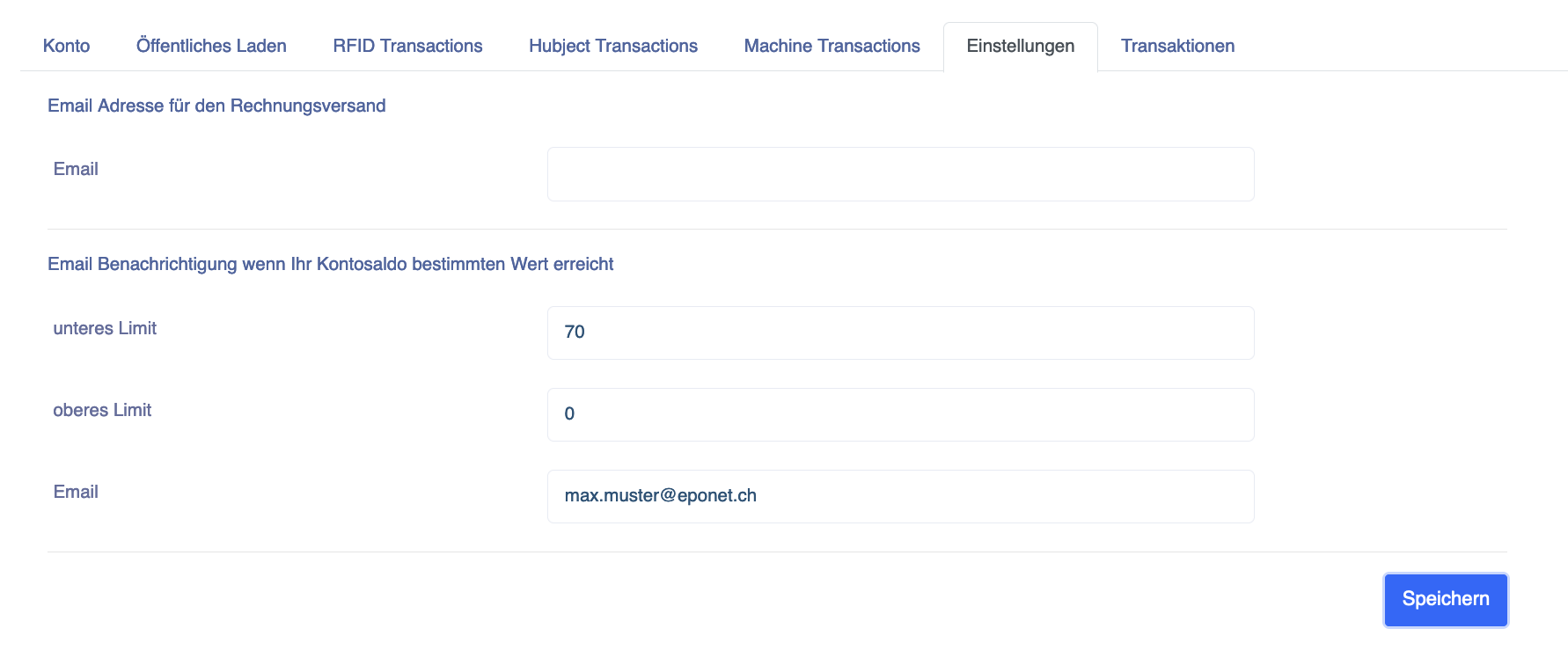
Erinnerung Mindest-Saldo: Damit Ihr Saldo nicht zu tief fällt, können Sie in Ihrem Profil bei Einstellungen bei «unteres Limit» einen Betrag eingeben, bei dem Sie auf Ihren tiefen Saldo-Stand aufmerksam gemacht werden:
Ich habe Geld auf mein Konto einbezahlt. Wieso fehlt die MwSt.?
Beim Saldo aufladen / Geld einzahlen gibt es keine Mehrwertsteuer Abrechnung - denn es wurde auch keine Leistung bezogen.
Dieser Vorgang verhält sich ähnlich wie in Ihrem Bankkonto, wenn Sie einen Kontoübertrag machen. Auch da gibt es keine Mehrwertsteuer Abrechnung. Erst, wenn Sie eine Dienstleistung nutzen, fällt eine Leistung an und diese wird in Ihrem Konto mit MwSt. ausgewiesen. Sie finden diese Quittungen für jeden Vorgang in Ihrem Konto unter Finanzen. Dort ist bei jeder Quittung auch die MwSt. Nummer des Leistungserbringers (falls MwSt. pflichtig) aufgeführt.
Wieso muss ich zum Geld auszahlen meine E-Mail Adresse validieren?
Ein Eponet Konto hat einen Saldostand und Sie können Geld einbezahlen und auch wieder abheben.
Wenn es um Ihr Geld geht, nehmen wir es mit der Sicherheit genau.
Aus diesem Grund können Sie auf jedem Konto auch die 2-Faktor Authentifizerung zu Ihrer Sicherheit aktivieren.
Auszahlungsprozess / E-Mail validieren
Im Auszahlungsprozess muss Ihre E-Mail Adresse einmalig zu Ihrer Sicherheit von uns validiert werden.
Gründe für eine Auszahlung gibt es viele. Wir haben Kunden die unseren Dienst nicht mehr benötigen und sich Ihr Restguthaben wieder auszahlen lassen möchten. Oder Verwaltungen die quartalsweise oder halbjährlich das Guthaben der Ladestationen abholen um die Stromrechnung zu bezahlen. Oder auch, wenn jemand einfach auf das falsche Konto Geld einbezahlt hat und dies somit wieder auszahlen muss. Auch dieser Prozess geht nur mit einer validierten E-Mail Adresse.
Bitte haben Sie Verständnis, dass in einem solchen Fall wo man in der Eile versehentlich auf ein falsches Konto einbezahlt hat, wir das Geld nicht von einem auf das andere Konto schieben können. Bei einer Bank können Sie auch nicht anrufen, wenn Sie CHF 200.- auf das Konto A bezahlt haben und die Bank bitten das Geld auf das Konto B umzubuchen.
Sind Sie ein Nutzer mit einem Konto für E-Mobilität oder Maschinen-Abrechnung und Ihre Konto E-Mail Adresse und Auszahlungs-E-Mail Adresse ist identisch und es gibt keine anderen Berechtigten auf Ihrem Konto - geht diese Validierung relativ unkompliziert und schnell.
Bei einer Firma, Mietliegenschaft oder Stockwerkeigentum - und Konten wo es mehrere Berechtige gibt - schauen wir etwas genauer hin und benötigen ein unterschriebenes Formular von jemand wo gemäss Zefix/Handelsregister eingetragen ist.
Bei Unterschriftsberechtigt zu zweit, benötigen wir beide Unterschriften.
Der Auszahlungsprozess ist hier beschrieben.
Ich kann mich nicht mehr einloggen - Die Login Seite verlangt 2 Faktor Verifizierung
Wenn Sie sich einloggen möchten und ein Pop-Up Fenster mit der Überschrift 2 Faktor Verifizierung erscheint, dann haben Sie dieses Sicherheits-Feature zuvor mir Ihrem Smartphone und einer Authenticator App (Google Authenticator oder Microsoft Authenticator App) aktiviert.
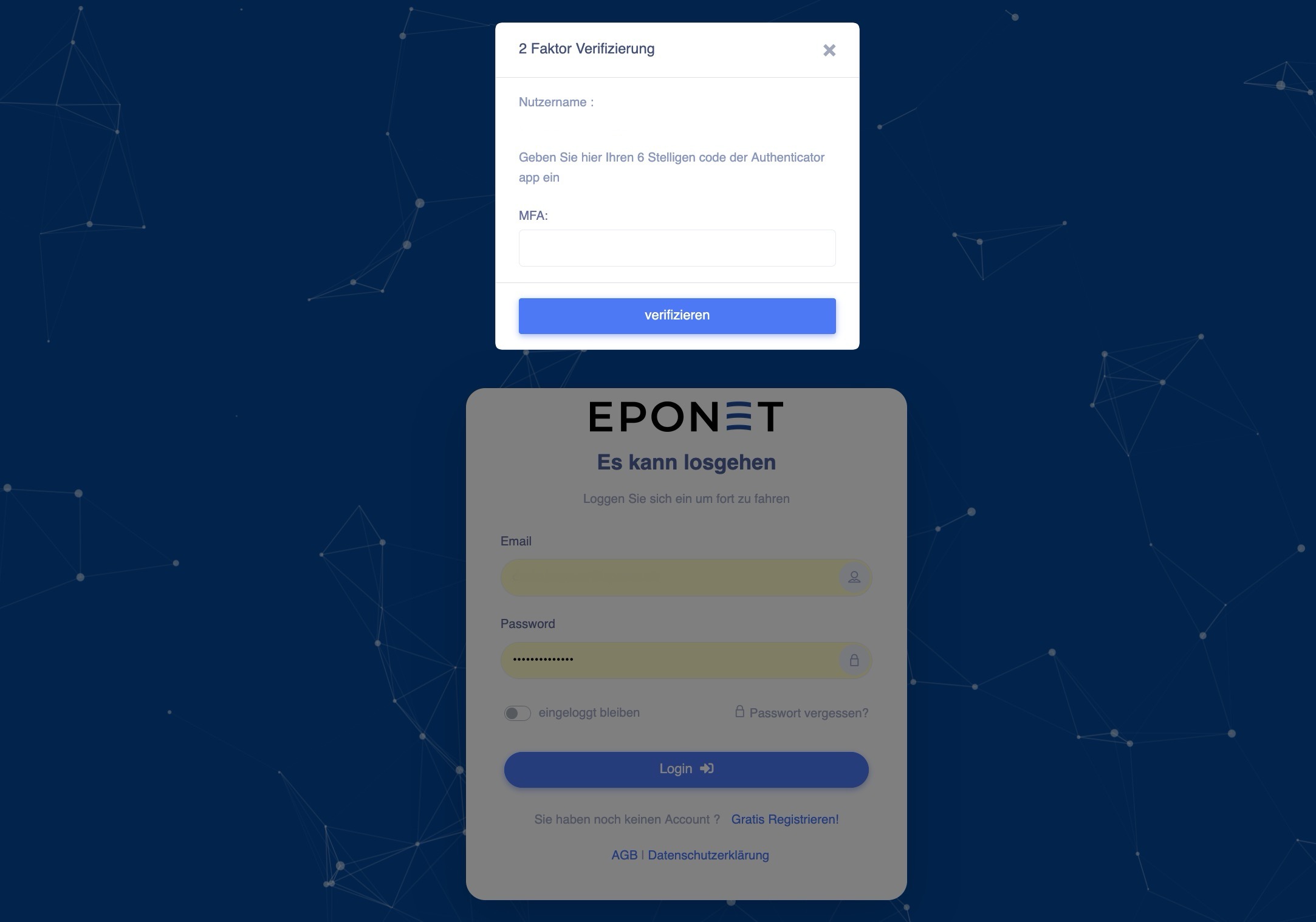
Vorsicht:
Bitte beachten Sie, die Zwei-Faktor-Authentifizierung ist eine Sicherheits-Komponente, welche bei falscher Bedienung von Eponet nicht einfach deaktiviert werden kann. Die Aktivierung kann nur mit der Authenticator App von Google oder Microsoft aktiviert - und somit auch nur wieder mit derselben App deaktiviert werden.
Fall Sie es aus irgendwelchen Gründen doch nicht deaktivieren können, kann dies kostenpflichtig wie hier beschrieben zurückgestellt werden.
Passwort vergessen - Wieso erhalte ich kein E-Mail um ein neues Passwort einzugeben?
Wenn Sie Ihr Passwort vergessen haben, können Sie sich beim Login Fenster mit der Funktion Passwort vergessen ein E-Mail mit einem Link um ein neues Passwort einzugeben zusenden lassen.
Wenn Sie kein E-Mail erhalten haben, prüfen Sie Ihren Spam / Junk Ordner.
Wenn Sie kein E-Mail im Posteingang finden, versuchen Sie nochmals mit der Funktion Passwort vergessen - aber haben Sie nach dem drücken des "Senden" Knopf Geduld bis Sie eine Bestätigung erhalten.
Bitte warten Sie, bis folgende Meldung erscheint. Verlassen Sie die Seite erst nach dieser Meldung:
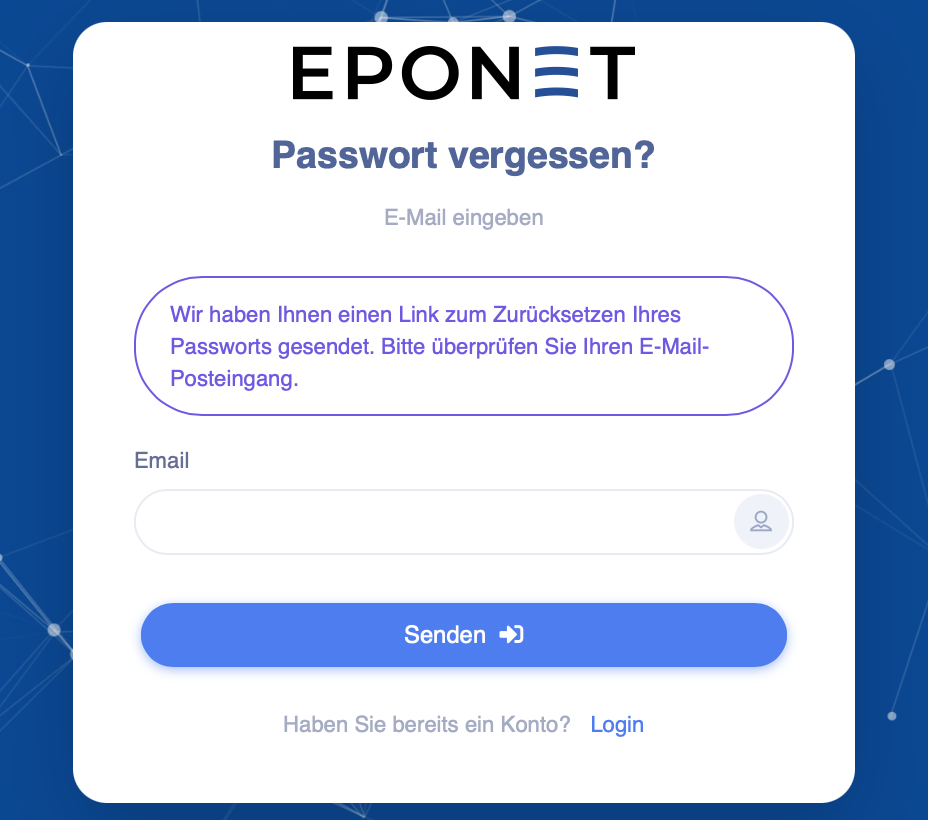
Der ganze Ablauf zum Vorgehen beim Passwort vergessen ist hier beschrieben: Passwort vergessen
Mein QR-Code Einzahlungsschein geht nicht
Wichtige Information zum Saldo aufladen via QR-Code Einzahlungschein
Wichtig
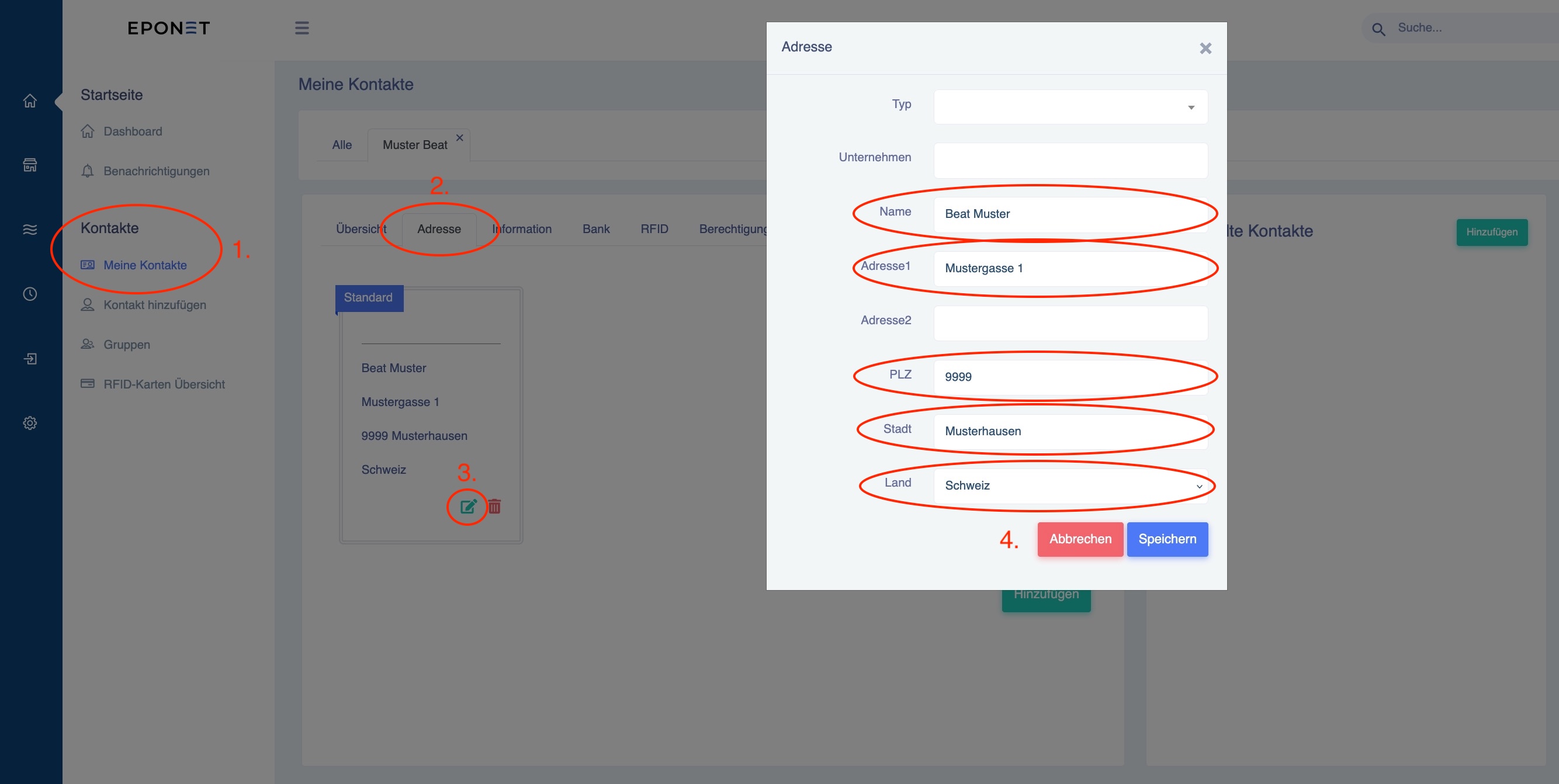
Ein QR-Code Einzahlungsschein funktioniert nur, wenn Ihre korrekte Adresse darauf ersichtlich ist. Bitte prüfen Sie zwingend Ihre Adresse. Auf der Startseite in Ihrem Konto finden Sie die diese unter:
- Kontakte (1.)
- Adresse (2.)
- und kann mit dem bearbeiten Icon (3.) ergänzt/kontrolliert werden
- Bitte alle Felder (4.) kontrollieren/eingeben.
Anmerkung: Fehlt zum Beispiel das Land kommt beim speichern die Meldung "Gescheitert".