# Eponet RFID reader for e-mobility

Do you have a charging station without an RFID reader? At Eponet, an OCPP charging station without an RFID reader can be retrofitted with an Eponet RFID reader device.

# Introduction to external Eponet RFID reader for e-mobility

Eponet offers an RFID reader in Edizio design. This RFID reader can be used in a variety of ways in the Eponet universe, for Eponet access control, Eponet TimeCatch time recording and now also as an RFID reader for charging stations without their own RFID reader.

[![Bildschirmfoto 2025-06-04 um 10.36.30.jpg](https://wiki.eponet.ch/uploads/images/gallery/2025-06/scaled-1680-/bildschirmfoto-2025-06-04-um-10-36-30.jpg)](https://wiki.eponet.ch/uploads/images/gallery/2025-06/bildschirmfoto-2025-06-04-um-10-36-30.jpg)  
Image: Eponet RFID reader in Edizio design

[![grafik.png](https://wiki.eponet.ch/uploads/images/gallery/2025-06/scaled-1680-/grafik.png)](https://wiki.eponet.ch/uploads/images/gallery/2025-06/grafik.png)  
Image: Example of an EVTEC charging station without an RFID reader

<p class="callout info">The basis for use at charging stations is a dedicated Eponet EdgeServer as an RFID unit and a USR device server. Several RFID readers can then be connected to the setup (max. 1 RFID reader per charging station). The Eponet team will be happy to answer any questions you may have.</p>

# Adding an Eponet RFID reader to a charging station

<p class="callout info">Once the EdgeServer and the required USR Device Server are installed on site, you can register the corresponding Eponet RFID readers as follows.</p>

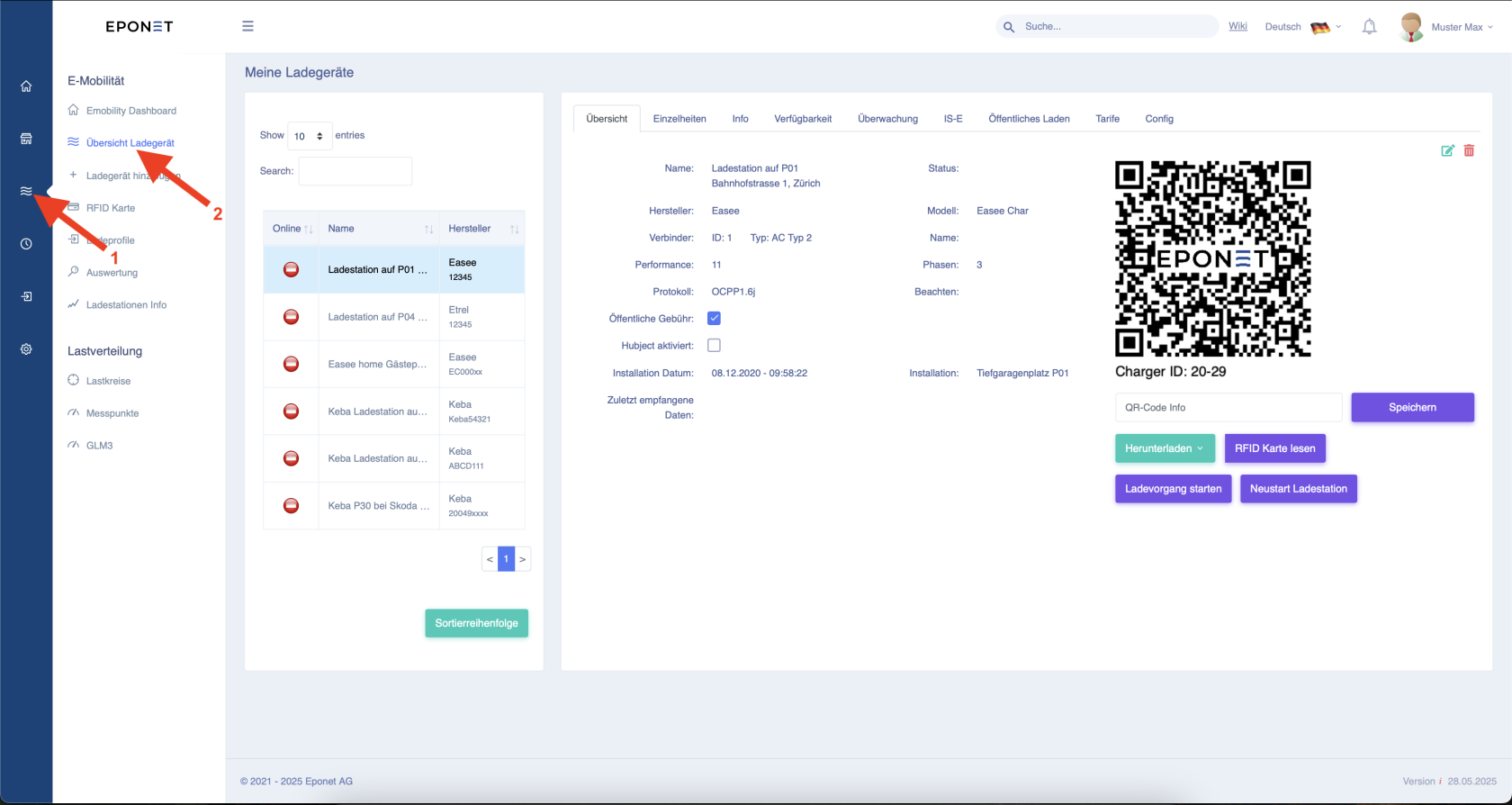
First, follow arrows 1 and 2.

[![Bildschirmfoto 2025-06-04 um 09.58.33.png](https://wiki.eponet.ch/uploads/images/gallery/2025-06/scaled-1680-/bildschirmfoto-2025-06-04-um-09-58-33.png)](https://wiki.eponet.ch/uploads/images/gallery/2025-06/bildschirmfoto-2025-06-04-um-09-58-33.png)

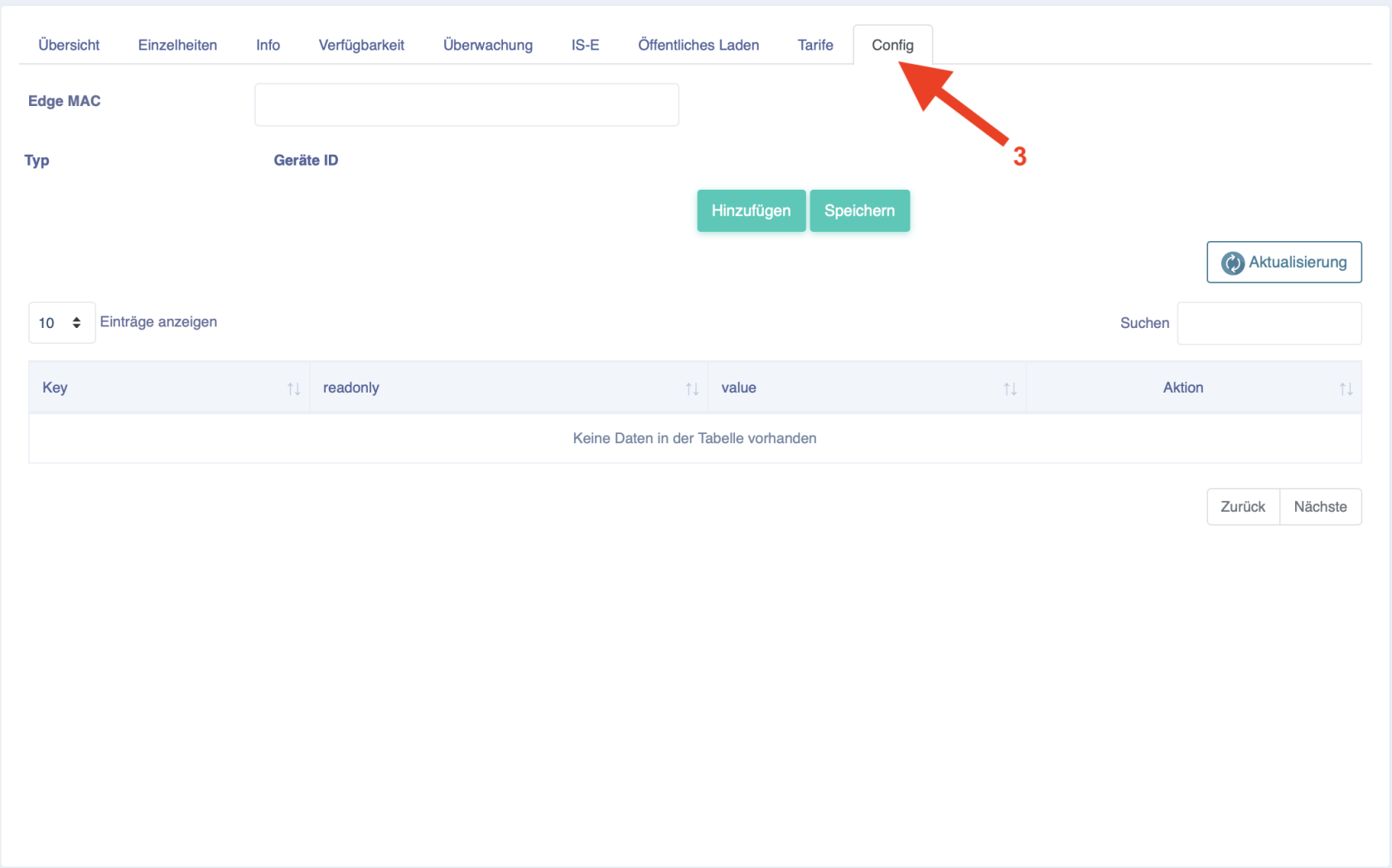
Now select the corresponding charging station and click on "Config" at arrow 3.

[![Bildschirmfoto 2025-06-04 um 09.58.44.png](https://wiki.eponet.ch/uploads/images/gallery/2025-06/scaled-1680-/Xjebildschirmfoto-2025-06-04-um-09-58-44.png)](https://wiki.eponet.ch/uploads/images/gallery/2025-06/Xjebildschirmfoto-2025-06-04-um-09-58-44.png)

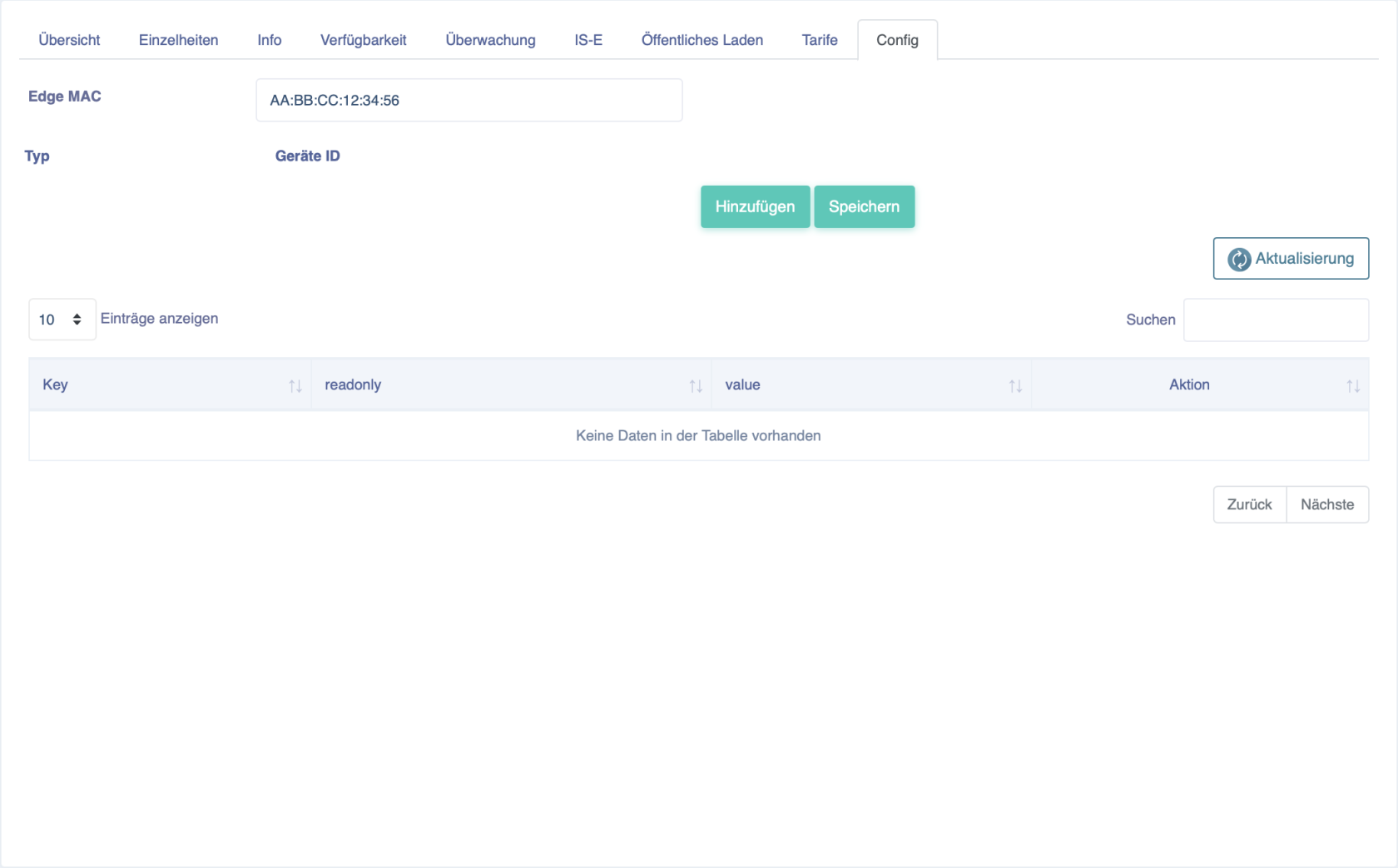
Now enter the Mac address of the EdgeServer for RFID management under "Edge MAC".

[![Bildschirmfoto 2025-06-04 um 09.59.09.png](https://wiki.eponet.ch/uploads/images/gallery/2025-06/scaled-1680-/bildschirmfoto-2025-06-04-um-09-59-09.png)](https://wiki.eponet.ch/uploads/images/gallery/2025-06/bildschirmfoto-2025-06-04-um-09-59-09.png)

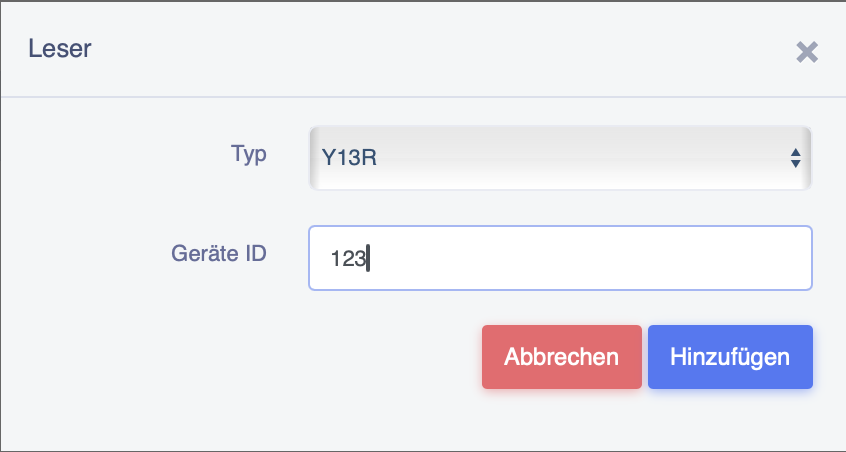
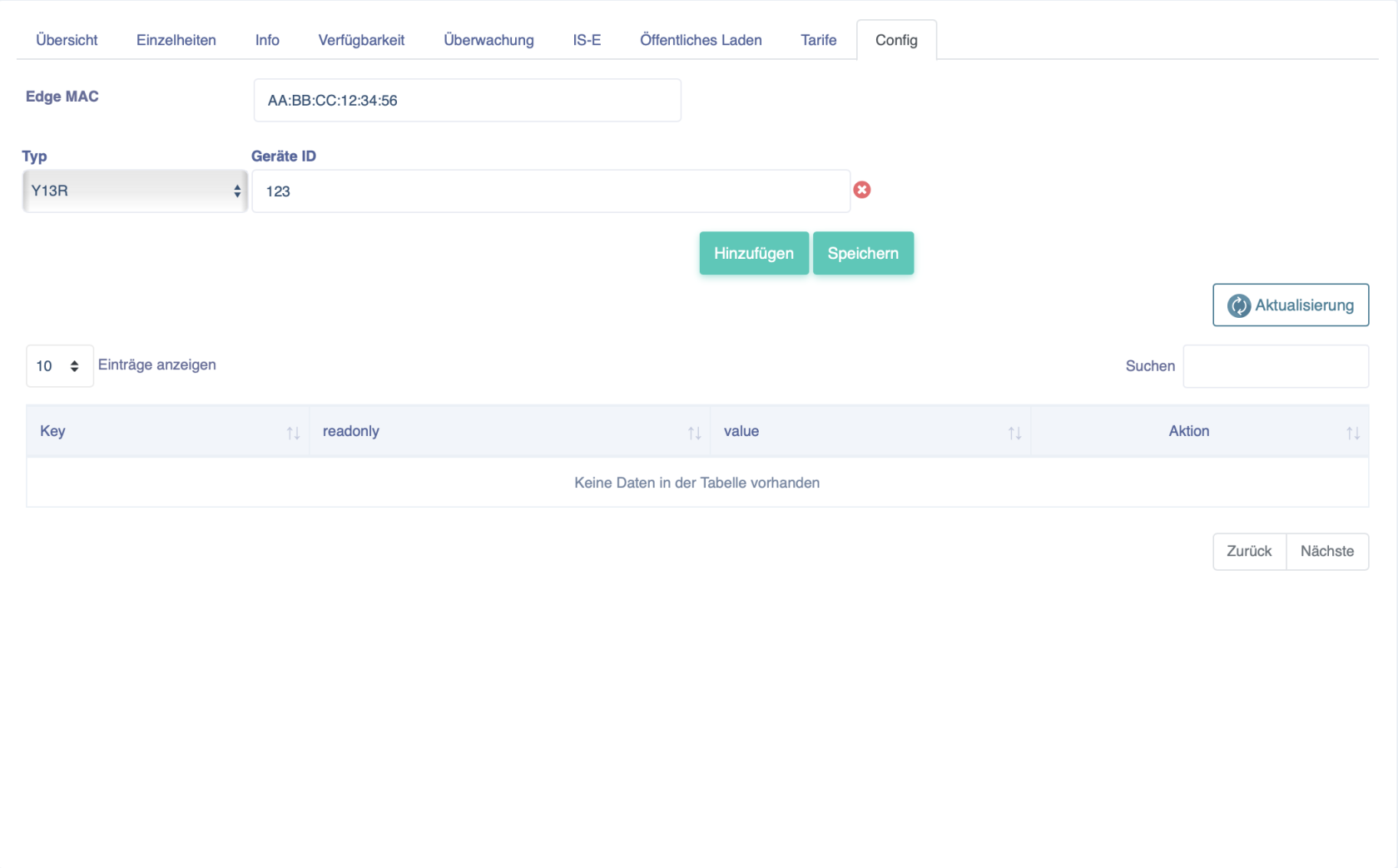
Now click on "Add" and enter the number that is manually written on the reader in "Device ID".  
Confirm this by clicking on "Add".

[![Bildschirmfoto 2025-06-04 um 09.59.25.png](https://wiki.eponet.ch/uploads/images/gallery/2025-06/scaled-1680-/bildschirmfoto-2025-06-04-um-09-59-25.png)](https://wiki.eponet.ch/uploads/images/gallery/2025-06/bildschirmfoto-2025-06-04-um-09-59-25.png)

It should then look as shown below and you can complete the configuration for this charging station by clicking on the "Save" button.

[![Bildschirmfoto 2025-06-04 um 09.59.44.png](https://wiki.eponet.ch/uploads/images/gallery/2025-06/scaled-1680-/bildschirmfoto-2025-06-04-um-09-59-44.png)](https://wiki.eponet.ch/uploads/images/gallery/2025-06/bildschirmfoto-2025-06-04-um-09-59-44.png)

<p class="callout warning">A reader can only be used for one charging station and not for several!</p>