Dieser Beitrag beschreibt, wie Sie Geld von Ihrem persönliches Eponet Konto auszahlen. Sie finden die Funktion unter Einstellungen > Finanzen, dort wo Sie auch immer den Saldostand und all Ihre Kontobewegungen sehen. Möchten Sie Geld auszahlen, gehen Sie auf den Reiter Transaktionen.
[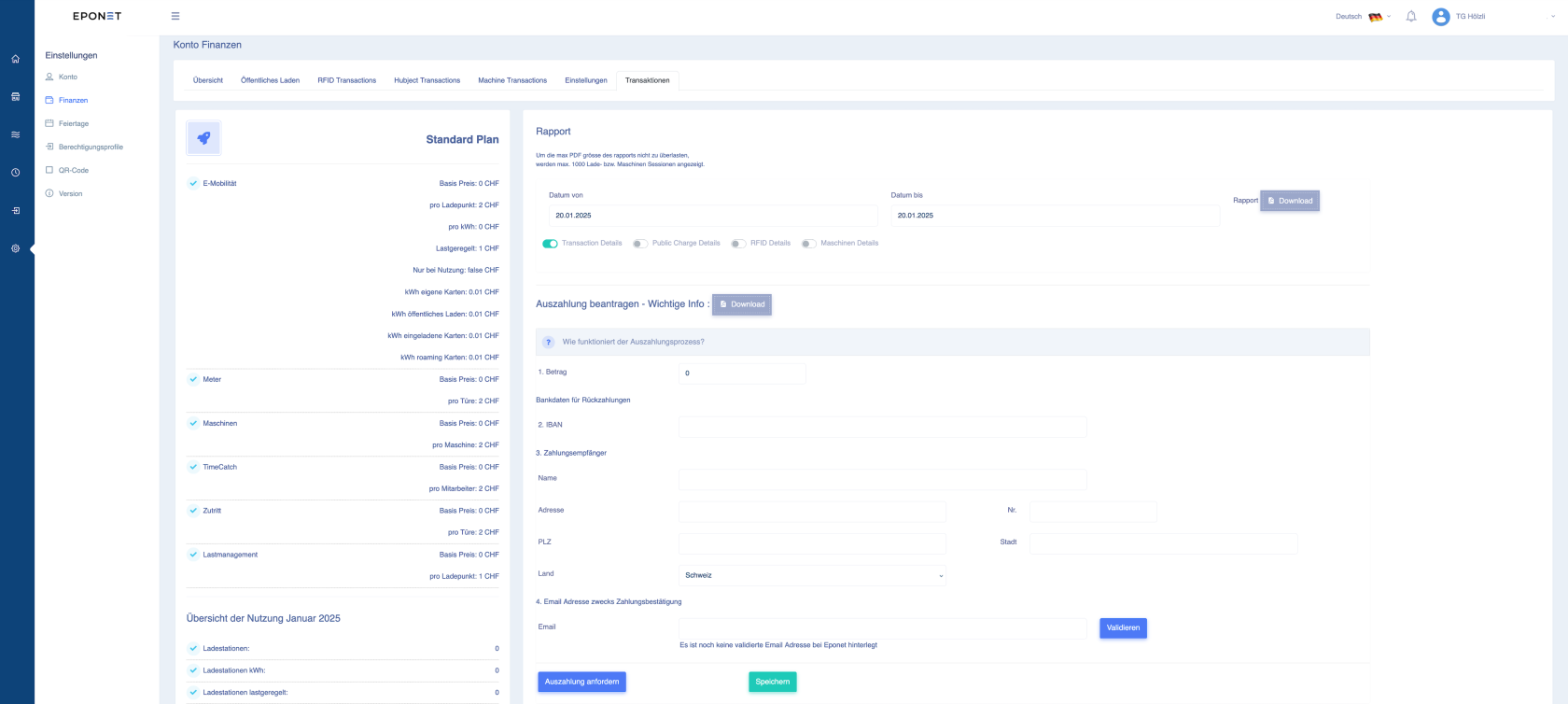](https://wiki.eponet.ch/uploads/images/gallery/2025-01/Socgrafik.png) ### ### E-Mail Validierung Der Reiter zur E-Mail Validierung finden Sie unter Finanzen. Dieser Prozess muss nur einmalig gemacht werden. [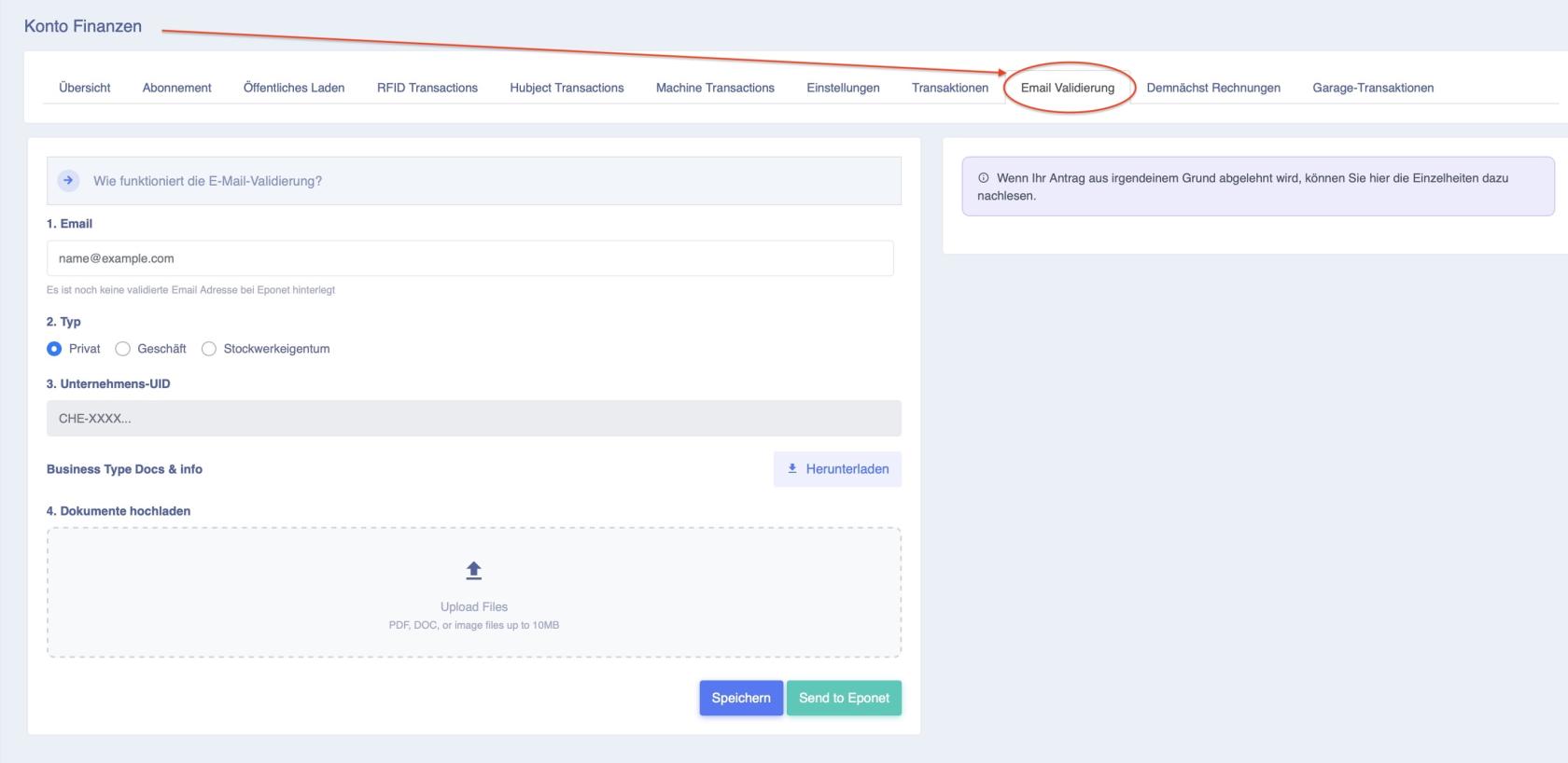](https://wiki.eponet.ch/uploads/images/gallery/2026-04/bildschirmfoto-2026-04-28-um-10-21-55.jpg) Unter dem Abschnitt "Auszahlung beantragen - wichtige Info" ist der Auszahlungsprozess beschrieben: [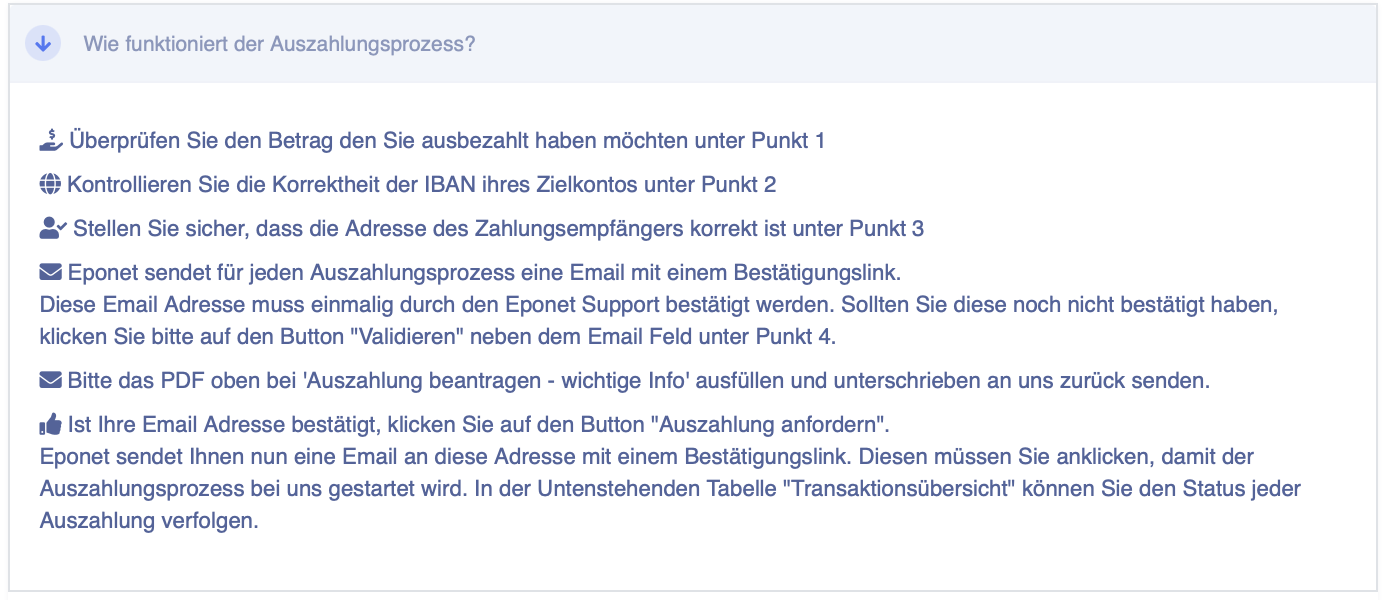](https://wiki.eponet.ch/uploads/images/gallery/2025-01/Nrlgrafik.png)Wichtig: Aus Sicherheitsgründen muss Ihre Email Adresse einmalig validiert werden. Ist die Konto Email Adresse identisch mit der zu validierenden Email Adresse wird diese von uns innert 1-2 Arbeitstage validiert und Sie können die Auszahlung vornehmen. Erklärung für die Validierung finden Sie [hier](https://wiki.eponet.ch/books/faq-rund-ums-portal/page/wieso-muss-ich-zum-geld-auszahlen-meine-e-mail-adresse-validieren). Für Firmen, Verwaltungen und Privatpersonen die für jemanden anderen die Auszahlung vornehmen möchten, muss folgendes Formular ausgefüllt und unterschrieben an uns zurück gesendet werden!
Formular Firma: [https://eponet.info/epowiki/avm.pdf](https://eponet.info/epowiki/avm.pdf) Formular Verwaltungen / STWE: [https://eponet.info/epowiki/avm-stweg.pdf](https://eponet.info/epowiki/avm-stweg.pdf) Formular Privat: [https://eponet.info/epowiki/avm-privat.pdf](https://eponet.info/epowiki/avm-privat.pdf)**Tipp:** Wenn Sie die Auszahlung anfordern, erhalten Sie zur Sicherheit eine Email mit einem Bestätigungslink. Vergessen Sie nicht die Auszahlung damit zu bestätigen!
Haben Sie den Bestätigungslink vergessen und er geht nicht mehr? Unten auf der Seite Transaktion - wenn Sie in der Tabelle bei der Transaktions Übersicht Ihren Auftrag anklicken, können Sie das "graue Daumen" Icon anklicken und das Mail mit dem Bestätigungslink neu auslösen: [](https://wiki.eponet.ch/uploads/images/gallery/2025-01/MHKgrafik.png) #### Status des Auszahlungsprozesses nachverfolgen Sie können jederzeit den Status des Auszahlungsprozesses nachverfolgen. Nachdem Sie im erhaltenen Mail der validierten E-Mail Adresse den Bestätigungslink angeklickt haben, sehen Sie "Auftrag bestätigt". Nun ist der Auszahlungsprozess auf Ihrer Seite abgeschlossen und der Auftrag wird kurz vor Mitternacht zu uns übermittelt und innert ein paar Arbeitstagen auf das hinterlegte Bankkonto ausbezahlt: [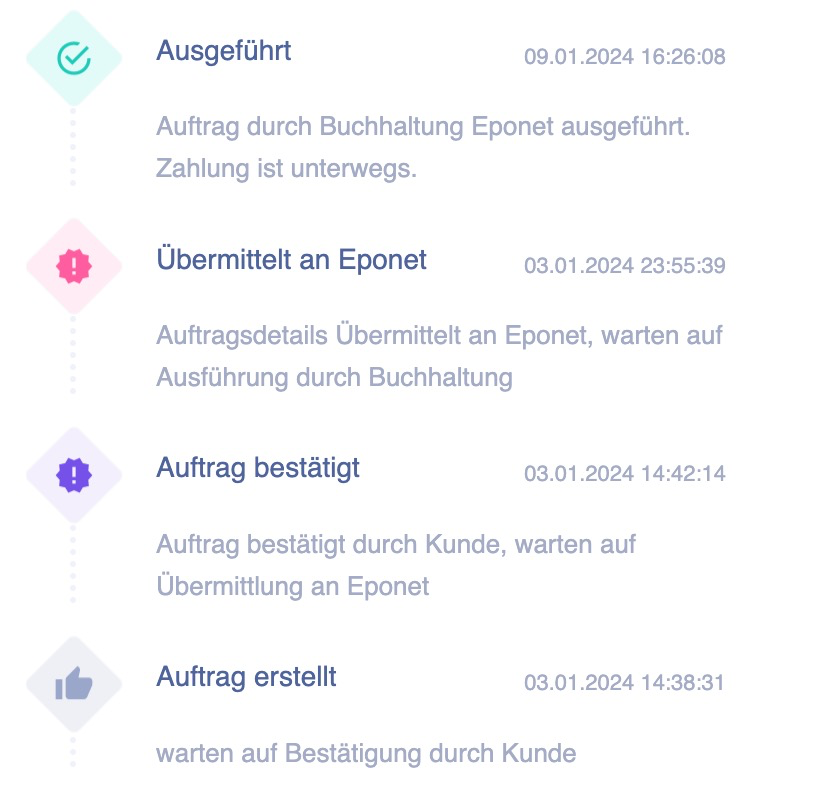](https://wiki.eponet.ch/uploads/images/gallery/2025-09/Dwcgrafik.png)